Manage secrets and credentials
Border0 is becoming Tailscale PAM. For more information, refer to Tailscale PAM.
Sometimes you need to configure credentials when you set up a socket. For example, when you need to authenticate to an upstream database. Given credentials are sensitive, keep credentials local instead of storing them in Border0 + Tailscale. You can use environment variables, a credential manager, or a secrets vault to keep your credentials local. In your connector configuration, integrate with one of these techniques, so you don't need to share your credentials with Border0. Instead, the connector loads the credentials dynamically when needed, and Border0 never sees your credentials.
Supported secret sources
The following credentials sources are supported. A dynamic credential always starts with from:
| Credential source | Credential format | Details |
|---|---|---|
| Environment variable | from:env:DB_USERNAME | The environment variable DB_USERNAME will be used as the credential. |
| File | from:file:/etc/database_username | The string found in the file /etc/database_username will be used as the credential. |
| AWS Systems Manager (SSM) parameter store | from:aws:ssm:/<your-path> | The secret stored in the AWS SSM parameter store at the path /<your-path> will be used as the credential. The connector requires the proper IAM role to read from the AWS SSM parameter store. |
| AWS Secrets Manager | from:aws:secretsmanager:/<your-path> | The secret stored in AWS Secrets Manager at the path <your-path> will be used as the credential. The connector requires the proper IAM role to read from the AWS Secrets Manager. |
| Keeper Secrets Manager | from:keeper:<record>:<field> | The secret stored in Keeper Secrets Manager will be used as the credential. For example, from:keeper:server1:password. The implementation checks both standard built-in template fields and custom fields to find the matching value. This integration uses the ksm CLI tool, which must be present on the machine and available in PATH. |
Extract fields from JSON secrets
Sometimes secrets are not stored as text-based strings, but instead as JSON objects. To support this common pattern, you can use a jq-like expression to extract a specific value from within a JSON structure, regardless of the secret backend.
This is useful when your secret contains multiple fields (like username, password, or nested objects), and you need only one of them at a time.
The following shows the syntax of the jq-like expression.
from:<source>:<path>,jq_exp=<expression>
<source>: The source can be any supported backend, such asaws:secretsmanager,aws:ssm, an environment variable, or a file.<path>: The identifier or location of your secret.jq_exp: A dot-notation expression that extracts a field from the JSON (similar tojq).
Examples
For the following secret:
{
  "username": "apiuser",
  "password": "sup3rs3cret!",
  "nested": {
    "token": "abc123token"
  }
}
You can reference fields like this:
from:aws:secretsmanager:testsecret,jq_exp=.username
Using the above example, this will return the username value: apiuser.
from:aws:secretsmanager:testsecret,jq_exp=.password
Using the above example, this will return the password value: sup3rs3cret!.
from:aws:secretsmanager:testsecret,jq_exp=.nested.token
Using the above example, this will return the nested.token value: abc123token.
You can now selectively extract and apply only the value you need, even from deeply nested secrets.
Reference credentials
All fields in the upstream configuration settings for a particular socket accept the from: parameter. You set the upstream configuration when you create or edit a socket.
If your secrets starts with from:, the connector will dynamically fetch the secret from the specified source.
The following are examples of using from: to load your credentials locally on the connector in real time.
| Socket type | Field |
|---|---|
| SSH - Upstream connection type: standard SSH | SSH Username SSH Password |
| Database | Upstream Username Upstream Password Hostname |
| AWS credentials | AWS Access Key ID AWS Secret Access Key |
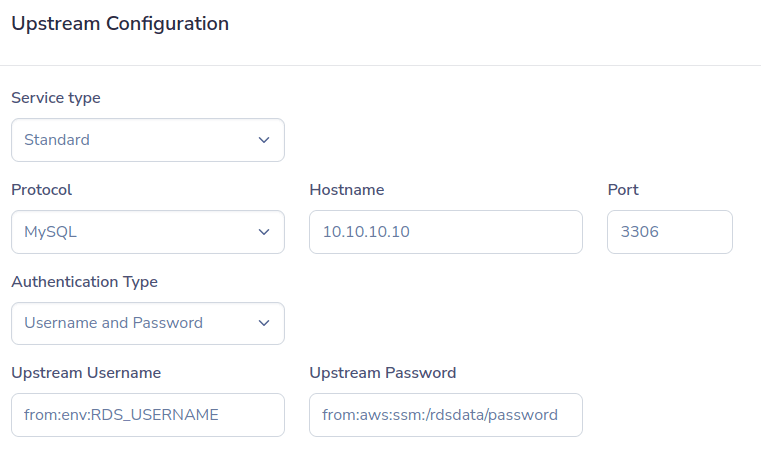
Database socket example
For a database socket, you can configure dynamically loaded credentials that the connector needs to communicate with the upstream database. In the following example, the username is loaded from the environment variable RDS_USERNAME. The password is loaded from the AWS SSM parameter store using the path /rdsdata/password.
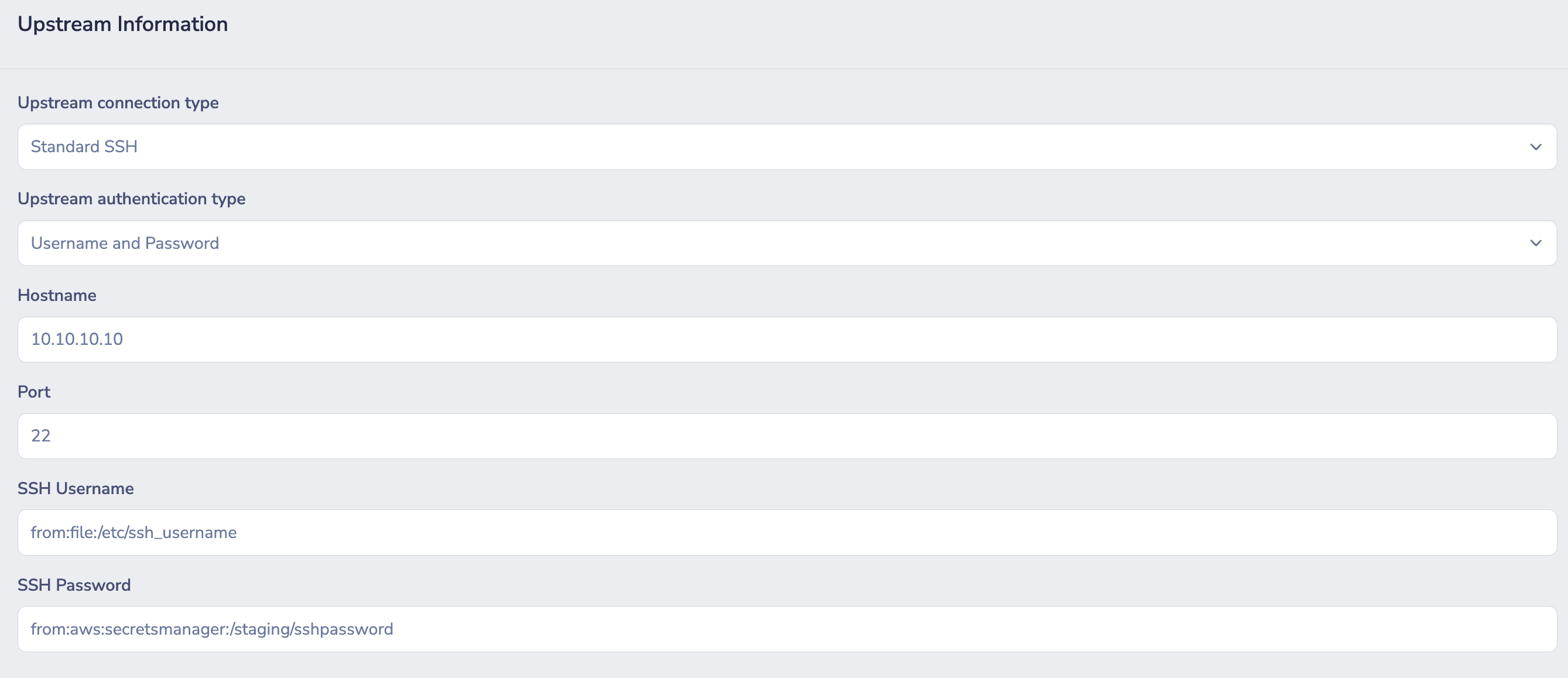
SSH socket example
For an SSH socket, you can configure dynamically loaded credentials that the connector needs to communicate with the upstream server. In the following example, the username is loaded from the file /etc/ssh_usernameon the connector host. The password is loaded from AWS Secrets Manager using the path /staging/sshpassword.
AWS Secrets Manager example
The following shows example secrets stored as JSON in AWS Secrets Manager.
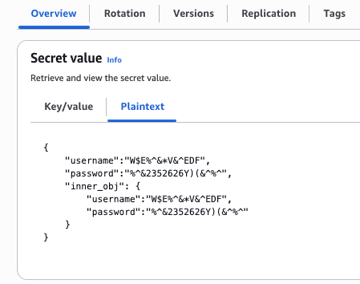
The following shows syntax for retrieving those secrets.
from:aws:secretsmanager:testsecret,jq_exp=.username
The value is W$E%^&*V&^EDF.
from:aws:secretsmanager:testsecret,jq_exp=.password
The value is %^&2352626Y)(&^%^.
from:aws:secretsmanager:testsecret,jq_exp=.inner_obj.username
The value is W$E%^&*V&^EDF.
from:aws:secretsmanager:testsecret,jq_exp=.inner_obj.password
The value is %^&2352626Y)(&^%^.