Domain aliases
When you create a Tailscale network (known as a tailnet), the domain of the first user's email address is set as the primary domain. For example, if bob@example.com creates a tailnet, the tailnet's domain will be example.com. If you have users in your identity provider whose email addresses use a different domain (like example.io), you can create a domain alias in the tailnet to allow those users to sign in to the tailnet too. Once you create a domain alias, other tailnets outside your organization cannot use that domain to authenticate.
Domain aliases can only be created for tailnets where users sign in with accounts under a custom domain, such as example.com. Shared domain tailnets, such as those created with @gmail.com addresses, cannot set up domain aliases. Tailnets using GitHub as their identity provider also cannot use domain aliases.
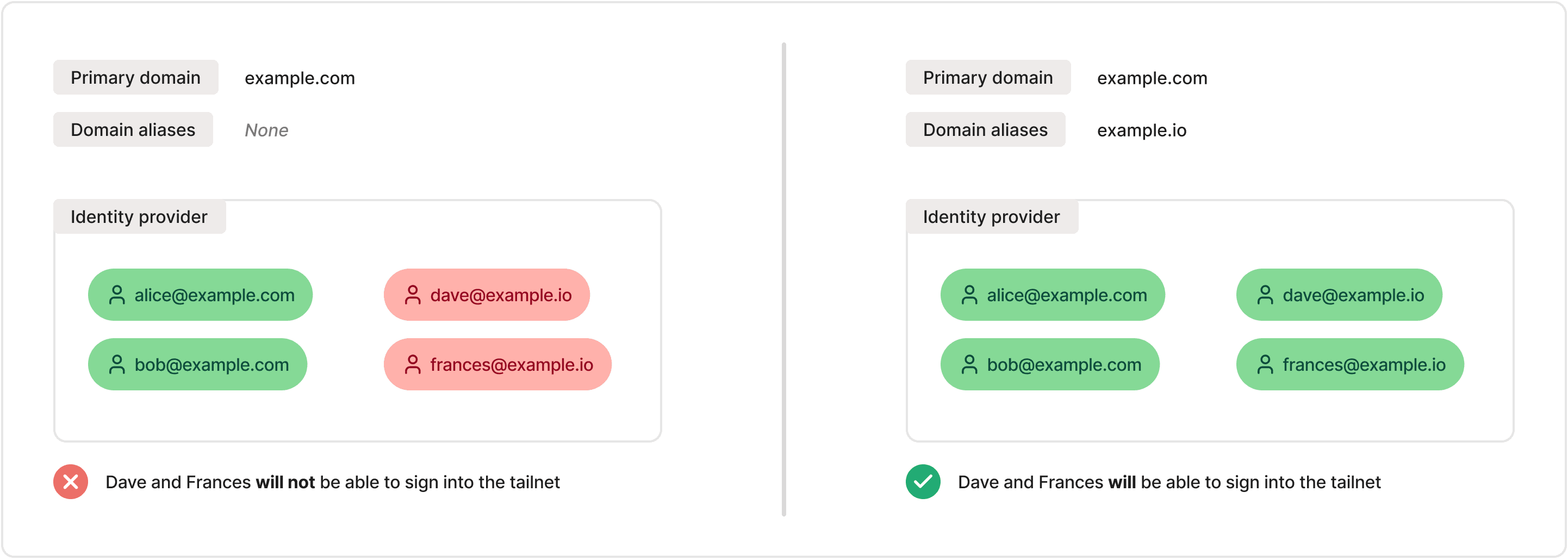
Create a domain alias
You need to be an Owner or Admin of a tailnet to create a domain alias.
- Open the Domains page.
- Verify the domain that you wish to add as a domain alias.
- Once the domain has been successfully verified, select the
 menu and select Set as domain alias.
 - Confirm that you want to enable the domain alias.
Remove a domain alias
You need to be an Owner or Admin of a tailnet to remove a domain alias.
- Open the Domains page.
- Find the domain alias you wish to remove, select the menu, then select Remove domain alias.
- If there are users associated with the alias, optionally select the checkbox to also delete those users from the tailnet. If you choose not to delete the users, any existing users under that domain will still be able to sign in to the tailnet, but new users under the formerly-aliased domain will not be able to sign in.
- Enter the domain name to confirm, then select Remove alias.
Handle legacy domain aliases
If you previously configured a domain alias by working directly with our support team, that alias will show up on the Domains page with a Legacy identifier. While it is not considered actively verified, the domain alias is still active. You can update the verification of this domain alias by selecting the menu and selecting Verify.
You can also remove legacy domain aliases on the Domains page. This option behaves the same as removing a domain alias for an actively-verified domain name.
Limitations
- Domain aliases can only be created for tailnets using a custom domain.
- Domain aliases can not be created for tailnets using GitHub as an identity provider.