Using Tailscale with your firewall
Most of the time, Tailscale works with existing firewalls without additional configuration. Thanks to NAT traversal, devices in a Tailscale network (known as a tailnet) can connect directly peer to peer, even through firewalls. When this isn't the case, you can usually resolve it by opening a firewall port to establish a direct connection.
For some firewalls, though, it is particularly difficult to establish a direct connection, so your traffic relies on DERP relay servers as a fallback, which might lead to slower connections. Refer to the list below for known issues and workarounds when using Tailscale with your firewall provider.
You can set up a Tailscale Peer Relay server to help devices connect when direct connections aren't possible. These are relay servers that you host on your own infrastructure. For more information, refer to the Tailscale Peer Relay documentation.
Refer to connection types in Tailscale to understand how to determine the connection type between two devices in your tailnet.
Latency vs security
Your organization might have configured a firewall to protect their network from unsolicited, unnecessary, or malicious traffic. Although the workarounds below might help Tailscale to establish direct connectivity between devices, these might also make it easier for other traffic to reach your network. Before implementing any of these changes, consider the pros and cons of making this trade-off between security and latency.
Specifically:
- By enabling NAT-PMP and UPnP, your network can allow in and forward all traffic.
- By opening a firewall port, your network will allow traffic on a certain port and meeting certain rules to leave your network. Restrict this traffic only to what is needed. Subscribe to this GitHub issue for updates on a Tailscale ruleset.
Firewall compatibility and workarounds
The following table summarizes the expected behavior of Tailscale with various firewall platforms, along with any known workarounds.
Tailnet devices only connect using a peer relay if you've configured at least one Tailscale Peer Relay server in your tailnet and created the appropriate access control rules to use them. Tailscale devices try to connect in the following order: directly peer to peer, using a Tailscale Peer Relay server if configured, then using a DERP relay server.
| Firewall | Expected behavior | Workaround |
|---|---|---|
| Barracuda | Connects using DERP or a peer relay | Increase Max UDP sessions, and open a firewall port |
| Check Point | Connects directly | n/a |
| Cisco | Connects using DERP or a peer relay | Open a firewall port |
| Cisco with Cisco Umbrella Endpoint Security | Connects using DERP or a peer relay | None |
| Fortinet | Connects using DERP or a peer relay | Randomize port |
| Fortinet with FortiGate deep packet inspection | Unable to connect to control plane | None |
| OPNsense | Connects using DERP or a peer relay | Enable NAT-PMP, or static NAT port mappings |
| pfSense | Connects using DERP or a peer relay | Enable NAT-PMP, or static NAT port mappings |
| Palo Alto Networks | Connects using DERP or a peer relay | Use Persistent Dynamic IP and Port |
| Sophos | Connects directly | n/a |
| UniFi Gateways | Connects using DERP or a peer relay | Allow peer-to-peer traffic |
For other firewalls, if your connections are using DERP relays by default, try opening a port to establish a direct connection. You can also set up a peer relay server in your tailnet to help devices connect when direct connections aren't possible.
If you experience an issue with a firewall not listed here, or need help configuring a particular firewall with Tailscale, contact support.
Barracuda
In networks with Barracuda firewalls, Tailscale devices will have difficulties making direct connections, and often resort to DERP relays.
To help Tailscale make direct connections, modify the maximum number of UDP sessions that a Barracuda firewall permits, making it easier for multiple Tailscale clients to connect, without competing with each other for UDP ports. To modify this, increase the "Max UDP" parameter in your firewall configuration.
You can also consider opening a firewall port or setting up a Tailscale Peer Relay server in your tailnet.
Check Point
In networks with Check Point firewalls, Tailscale devices should be able to establish direct connections by default.
Cisco
In networks with Cisco firewalls, Tailscale devices will have difficulties making direct connections, and often resort to DERP relays.
To help Tailscale make direct connections, consider opening a firewall port.
Cisco Umbrella Endpoint Security
If you are using Cisco Umbrella Endpoint Security, then the above will not work to establish direct connections, and your traffic will always resort to DERP relays.
Cisco Umbrella DNS Filtering
For DNS filtering using Cisco Umbrella (formerly OpenDNS), Umbrella/OpenDNS will override DNS settings set by Tailscale without additional configuration. To configure the two together:
- Configure Umbrella/OpenDNS to send
*.<your-tailnet-name>.ts.netqueries to100.100.100.100.100.100.100.100or Quad100 is a special Tailscale IP address in your Tailscale network (known as a tailnet) that provides essential local services including a DNS resolver. - Disable MagicDNS in the Tailscale admin console.
- Disable Override DNS servers in the Tailscale admin console and on end-user clients with an MDM system policy.
This configures clients to continue to use Umbrella for all DNS queries, while configuring Umbrella to use Tailscale's Quad100 DNS resolver for tailnet-specific queries.
Fortinet
In networks with Fortinet firewalls, Tailscale devices will have difficulties making direct connections, and often resort to DERP relays. This issue might not be present at a smaller scale, with issues occurring once more than 5 individuals are using Tailscale behind the same firewall.
To allow direct connections, in the Access controls page of the admin console, include an option in your tailnet policy file to randomizeClientPort. This makes devices use a random port for WireGuard rather than the default static port 41641.
{
  // Tailnet policy file settings and other configurations
  "randomizeClientPort": true
}
If you are using FortiGate application control rules with certain configurations, your firewall will intercept HTTPS connections to the Tailscale control plane, and nodes in your network will be unable to connect to Tailscale. If this happens, a certificate verification error similar to the one below will display in the Tailscale client UI and in the output of the Tailscale CLI tailscale status command:
fetch control key: Get "https://controlplane.tailscale.com/key?v=123": x509: "controlplane.tailscale.com" certificate is not trusted
To address the issue, go to the FortiOS admin console from a browser, select Security Profiles, then Application Control. Disable or reduce the scope of any security profiles that perform SSL inspection. In particular, verify that you are not using any default rules that block traffic belonging to the Proxy category or match against the Tailscale application defined in FortiGuard. This is currently the only known workaround.
Netskope
In networks with Netskope, Tailscale devices will have difficulties making direct connections and often resort to using relayed connections.
You can configure Netskope to ignore Tailscale and allow its traffic to bypass Netskope's filtering and cloud proxy. To do so:
-
Create a Custom Certificate Pinned Application for your platforms in use with the following process names:
Platform Type Process Names Android/ChromeOS Exact com.tailscale.ipniOS Exact io.tailscale.ipn.ios,io.tailscale.ipn.ios.network-extensionLinux Exact tailscaledmacOS (from Mac App Store) Exact io.tailscale.ipn.macos,io.tailscale.ipn.macos.network-extensionmacOS (standalone) Exact io.tailscale.ipn.macsys,io.tailscale.ipn.macsys.network-extensionWindows Exact tailscale-ipn.exe,tailscale.exe,tailscaled.exe -
Add steering bypass exceptions for the following criteria:
Criteria Values Domains *.tailscale.com,*.ts.net
OPNsense and pfSense
In networks with OPNsense and pfSense firewalls, Tailscale devices will have difficulties making direct connections and often resort to using relayed connections.
However, there are options to allow direct connections, such as NAT Port Mapping Protocol (NAT-PMP), static NAT port mapping, and Universal Plug and Play (UPnP). For more information, refer to the instructions for pfSense and OPNsense.
You can also run Tailscale directly on these routers using a plugin for pfSense and the FreeBSD Tailscale package for OPNsense.
Palo Alto Networks
Using Persistent Dynamic IP and Port in the NAT Policy translation type lets Tailscale to establish direct WireGuard connections through the firewall.
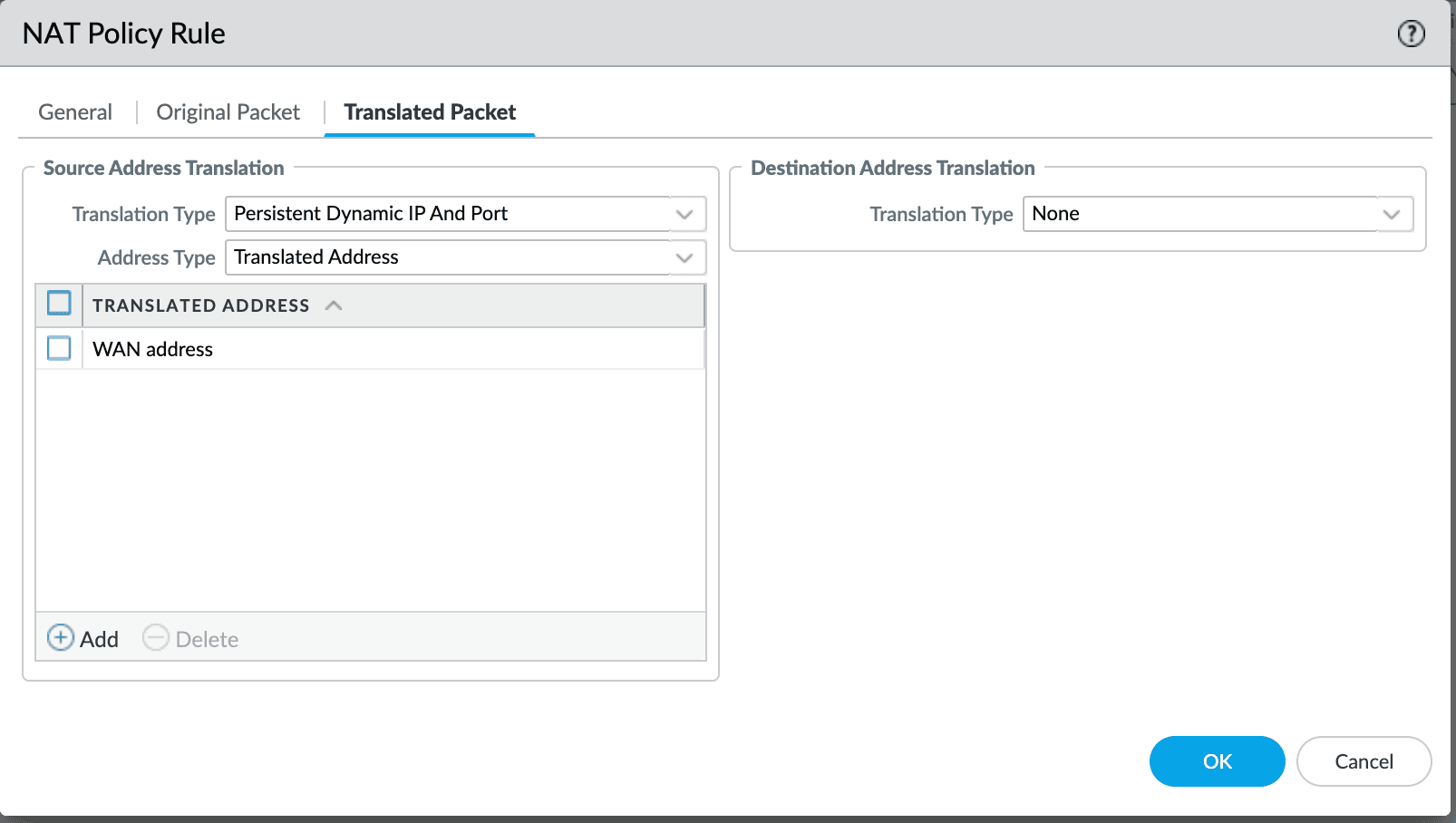
Persistent Dynamic IP support is available in PAN-OS 11.1.1 and later. There is a separate topic for Palo Alto Networks firewalls covering more detail and several additional options.
Sophos
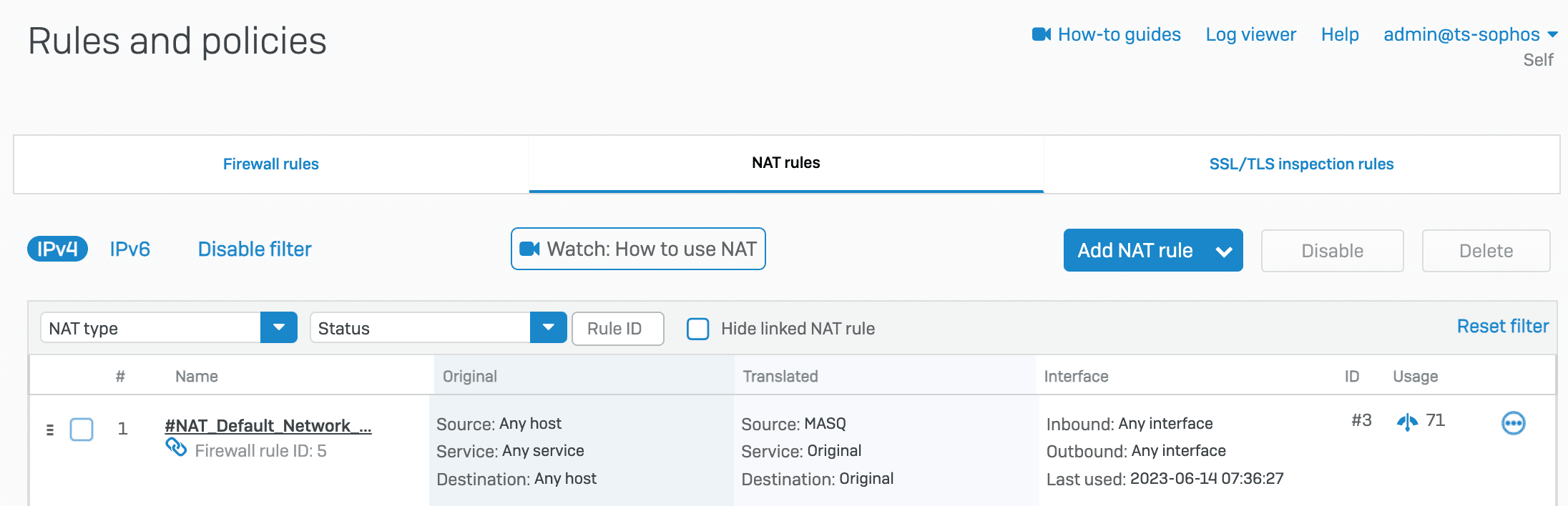
In networks with Sophos security gateways, the default firewall settings work well for Tailscale connectivity. It chooses a random port for the very first mapping, then uses that same port for all subsequent flows using the same source port. This lets Tailscale at the other end to know what port it should use for sending traffic.
To confirm this, use the Tailscale CLI command tailscale netcheck to ensure that MappingVariesByDestIP: false is the relevant point.
UniFi Gateways
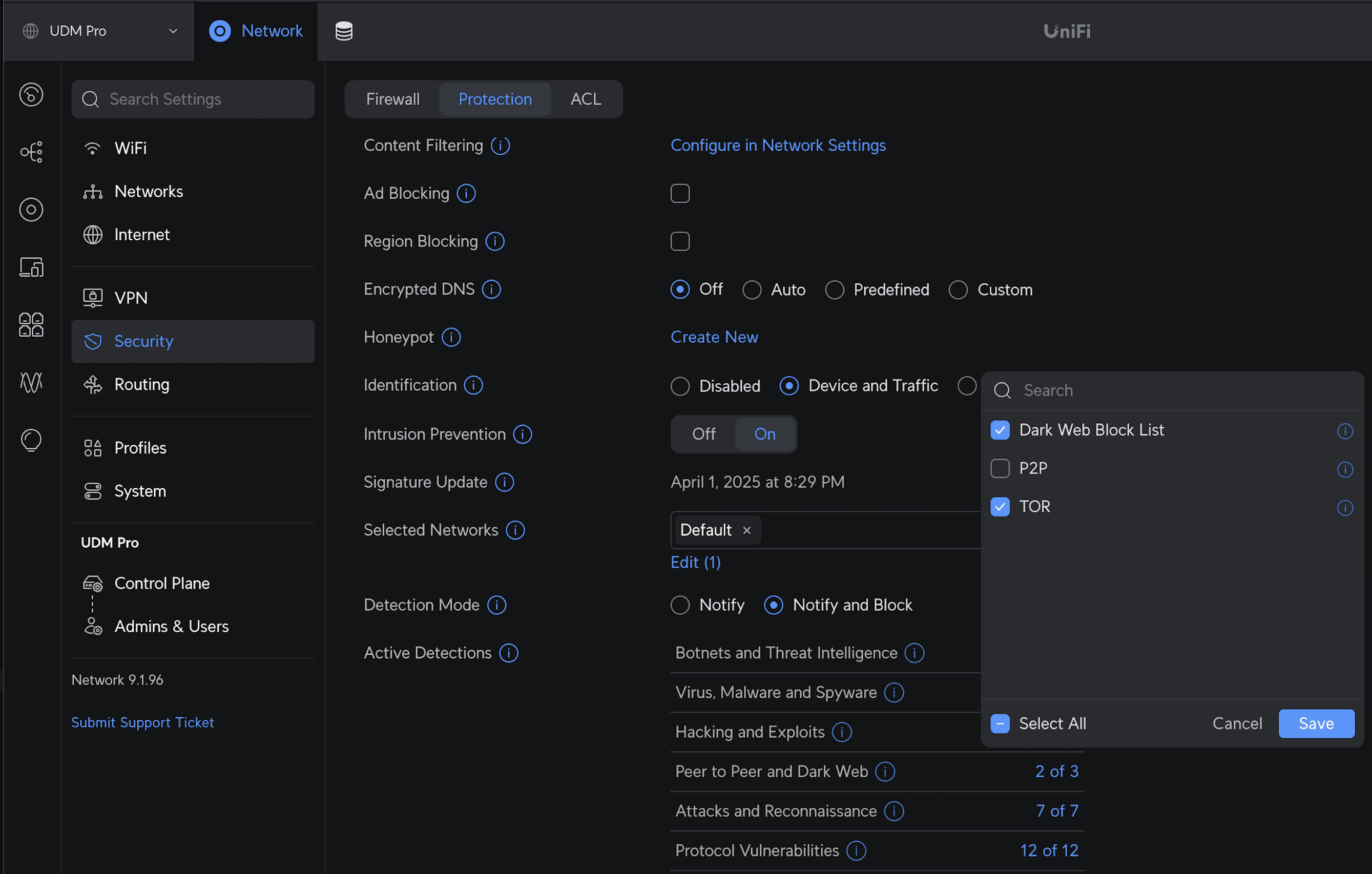
If you have a UniFi security gateway with threat detection enabled, make sure to allow peer-to-peer traffic for the nodes in your tailnet.
In UniFi Network version 9.0.107 and earlier, select to Settings, Firewall & Security, Edit threat categories, and uncheck P2P.
In UniFi Network version 9.0.108 and later, select to Network, Security, Protection, Peer to Peer and Dark Web, and uncheck P2P.
Only allow traffic over Tailscale
You can also use a firewall to restrict traffic in your network to require the use of Tailscale. For example, refer to instructions on using ufw to lock down an Ubuntu server.