User & group provisioning for custom providers
Tailscale supports System for Cross-domain Identity Management (SCIM) to provision users and groups from your identity provider to Tailscale.
Some identity providers, like Okta and Microsoft Entra, support SCIM natively. For others, Tailscale's SCIM API endpoints can be called directly to provision users and groups.
Features
The following provisioning features are supported:
- Create users in Tailscale from your identity provider
- Update user attributes in Tailscale from your identity provider
- Deactivate users in your identity provider to suspend them in Tailscale
- Group push from your identity provider to Tailscale
Enable Provisioning
Generate a SCIM API key
-
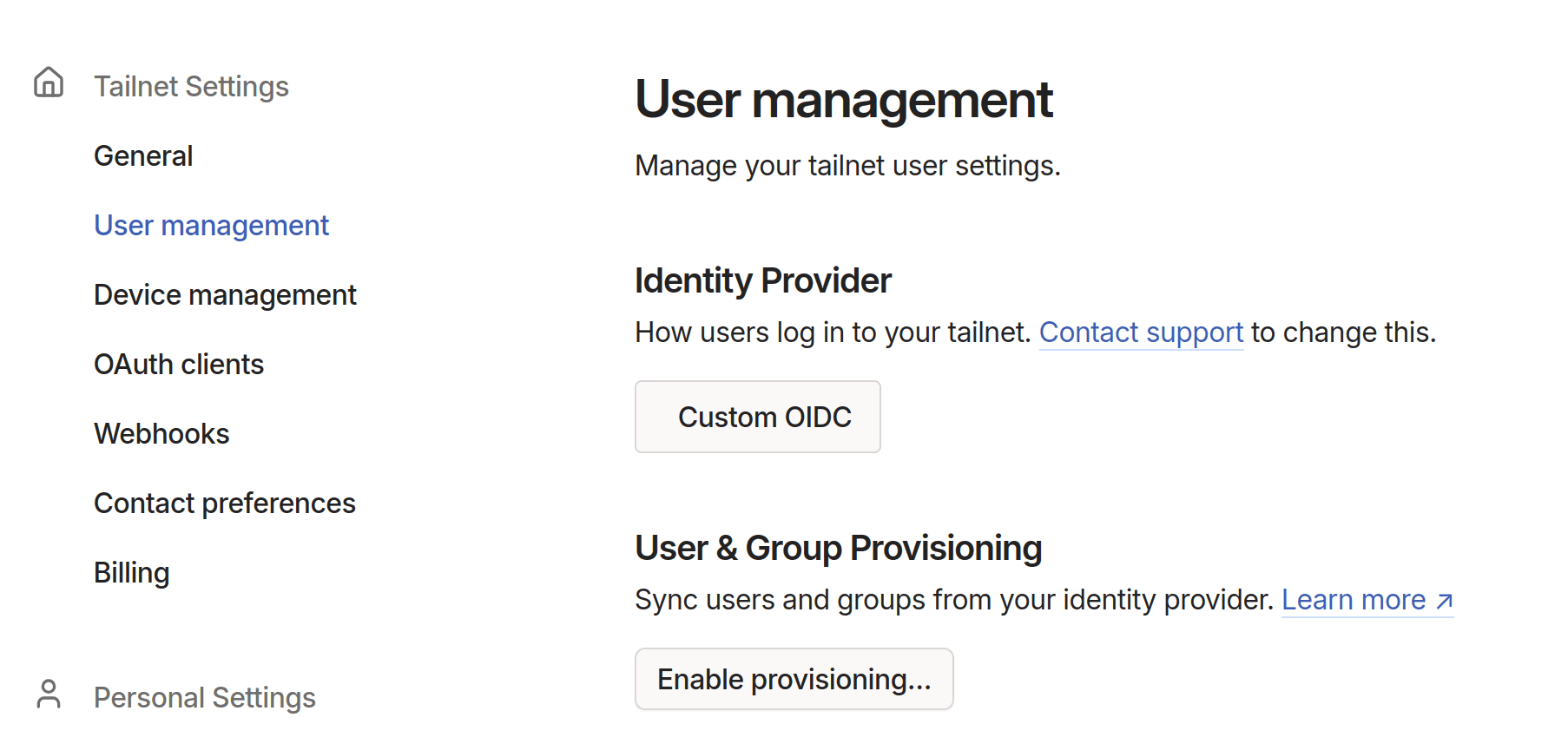
In the User management page of the admin console, under User & Group Provisioning, select Enable Provisioning.
-
Copy the generated key to the clipboard. This key will be provided to the SCIM API as a bearer token in the
Authorizationheader.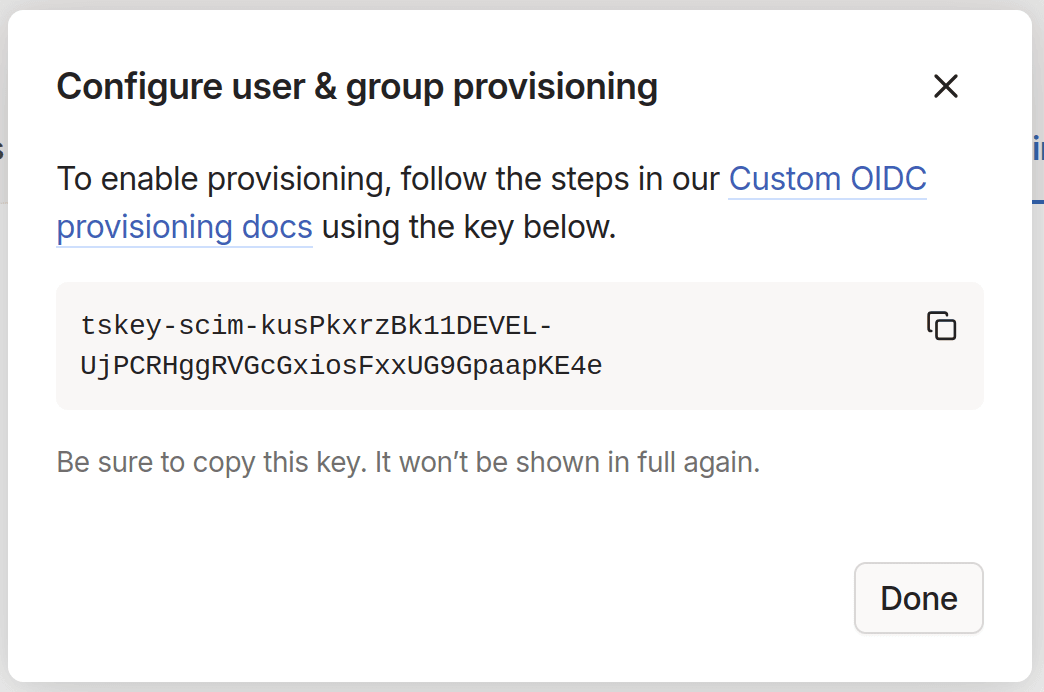
SCIM API
SCIM is a relatively simple RESTful API that operates on User and Group resources. The data schema and protocol are defined in RFC7643 and RFC7644.
Tailscale's SCIM API endpoint is located at https://api.tailscale.com/scim/v2.
Example API calls
Here are examples of some of the most common SCIM API calls. Refer to the SCIM specifications for more information.
List users
To list all users, send a GET request to the /Users endpoint:
curl -H "Authorization: Bearer ${SCIM_KEY}" \
  https://api.tailscale.com/scim/v2/Users
You can use the filter query parameter to search for users that match a query, and the attributes parameter to only return certain attributes for each user. For example, to get the username field for a user that matches a specific externalId:
curl -s \
  -H "Authorization: Bearer ${SCIM_KEY}" \
  'https://api.tailscale.com/scim/v2/Users?filter=externalId+eq+"123"&attributes=username' \
  | jq .

{
  "Resources": [
    {
      "id": "LDeihfrJiC21DEVEL",
      "meta": {
        "resourceType": "User",
        "location": "Users/LDeihfrJiC21DEVEL"
      },
      "schemas": [
        "urn:ietf:params:scim:schemas:core:2.0:User"
      ],
      "userName": "test@example.com"
    }
  ],
  "itemsPerPage": 100,
  "schemas": [
    "urn:ietf:params:scim:api:messages:2.0:ListResponse"
  ],
  "startIndex": 1,
  "totalResults": 1
}
Create a user
To create a user, send a POST request to the /Users endpoint with a JSON body containing the user attributes:
curl -X POST \
  -H "Authorization: Bearer ${SCIM_KEY}" \
  https://api.tailscale.com/scim/v2/Users \
  --data-raw '{
  "schemas":["urn:ietf:params:scim:schemas:core:2.0:User"],
  "displayName":"Test user",
  "externalId":"123",
  "username":"test@example.com",
  "emails":[{"value":"test@example.com"}]
}'
At a minimum, username and emails are required. If externalId is provided, it must match the same sub value provided for the user in OpenID Connect.
The response will contain an id field, which is the unique identifier for the user in Tailscale. This ID is used to reference the user in subsequent API calls.
{
  "id": "LDeihfrJiC21DEVEL",
  "userName": "test@example.com",
  "active": true,
  "displayName": "test@example.com",
  "name": { "familyName": "-", "givenName": "-" },
  "emails": [{ "primary": true, "value": "test@example.com" }],
  "meta": {
    "resourceType": "User",
    "created": "2025-05-21T22:50:13Z",
    "lastModified": "2025-05-21T22:50:13Z",
    "location": "Users/LDeihfrJiC21DEVEL",
    "version": "W/\"d-ukZmkHbatJDyDZqNS3OXGGwBEd5b61thjSo78ucJA\""
  },
  "schemas": ["urn:ietf:params:scim:schemas:core:2.0:User"]
}
Update user attributes
Individual attributes can be updated using a PATCH request to the /Users/{id} endpoint with a JSON Patch body. For example, to suspend a user, set the active attribute to false:
% curl -X PATCH \
  -H "Authorization: Bearer ${SCIM_KEY}" \
  https://api.tailscale.com/scim/v2/Users/LDeihfrJiC21DEVEL
  --data-raw '{
  "schemas": ["urn:ietf:params:scim:api:messages:2.0:PatchOp"],
  "Operations": [{
    "op": "replace",
    "value": {"active":false}
  }]
}'
Delete a user
To delete a user, send a DELETE request to the /Users/{id} endpoint:
% curl -X DELETE \
  -H "Authorization: Bearer ${SCIM_KEY}" \
  https://api.tailscale.com/scim/v2/Users/LDeihfrJiC21DEVEL
List groups
To list all groups, send a GET request to the /Groups endpoint:
curl -H "Authorization: Bearer ${SCIM_KEY}" \
  https://api.tailscale.com/scim/v2/Groups
This endpoint supports the same filter and attributes query parameters as the /Users endpoint.
Create a group
To create a group, send a POST request to the /Groups endpoint with a JSON body containing the group attributes:
curl -X POST \
  -H "Authorization: Bearer ${SCIM_KEY}" \
  https://api.tailscale.com/scim/v2/Groups
  --data-raw '{
  "schemas":["urn:ietf:params:scim:schemas:core:2.0:Group"],
  "displayName":"test group",
  "members":[
    {"value":"LDeihfrJiC21DEVEL","display":""}
  ]
}'
The members field identifies the IDs of users to add to the group. Each user must have a "display" field, but it can be empty.
Update group attributes
Update group attributes using a PATCH request to the /Groups/{id} endpoint with a JSON Patch body. For example, to add a group member, send an add operation on the members field:
% curl -X PATCH \
  -H "Authorization: Bearer ${SCIM_KEY}" \
  https://api.tailscale.com/scim/v2/Groups/sZkaCVkrC221DEVEL
  --data-raw '{
  "schemas": ["urn:ietf:params:scim:api:messages:2.0:PatchOp"],
  "Operations": [
    {
      "op": "add",
      "path": "members",
      "value": [
        {
          "value": "LDeihfrJiC21DEVEL",
          "display": "%s"
        }
      ]
    }
  ]
}'
Or to remove a member:
% curl -X PATCH \
  -H "Authorization: Bearer ${SCIM_KEY}" \
  https://api.tailscale.com/scim/v2/Groups/sZkaCVkrC221DEVEL
  --data-raw '{
  "schemas": ["urn:ietf:params:scim:api:messages:2.0:PatchOp"],
  "Operations": [
    {
      "op": "remove",
      "path": "members[value eq \"%s\"]"
    }
  ]
}'
Delete a group
To delete a group, send a DELETE request to the /Groups/{id} endpoint:
% curl -X DELETE \
  -H "Authorization: Bearer ${SCIM_KEY}" \
  https://api.tailscale.com/scim/v2/Groups/sZkaCVkrC221DEVEL