
Third-party deep packet inspection (DPI) solutions with Tailscale
Last validated:
Tailscale uses end-to-end encryption for all traffic between devices on your tailnet, preventing inspection of the WireGuard tunnels through methods like deep packet inspection (DPI). However, you can deploy third-party deep packet inspection (DPI) solutions alongside Tailscale to inspect traffic after it exits a Tailscale device. This guide describes how to set up a Tailscale exit node to forward traffic to a third-party DPI solution for inspection.
When traffic arrives at a Tailscale connector, Tailscale decrypts the traffic using the connector's private key, and forwards the decrypted traffic to the destination address. This destination address can be the local device, another device on the local network (as in the case with a subnet router), or another location on the public internet (as in the case with an exit node or app connector). To inspect the traffic, the DPI solution must observe the traffic after Tailscale decrypts it and as it's forwarded to the destination.
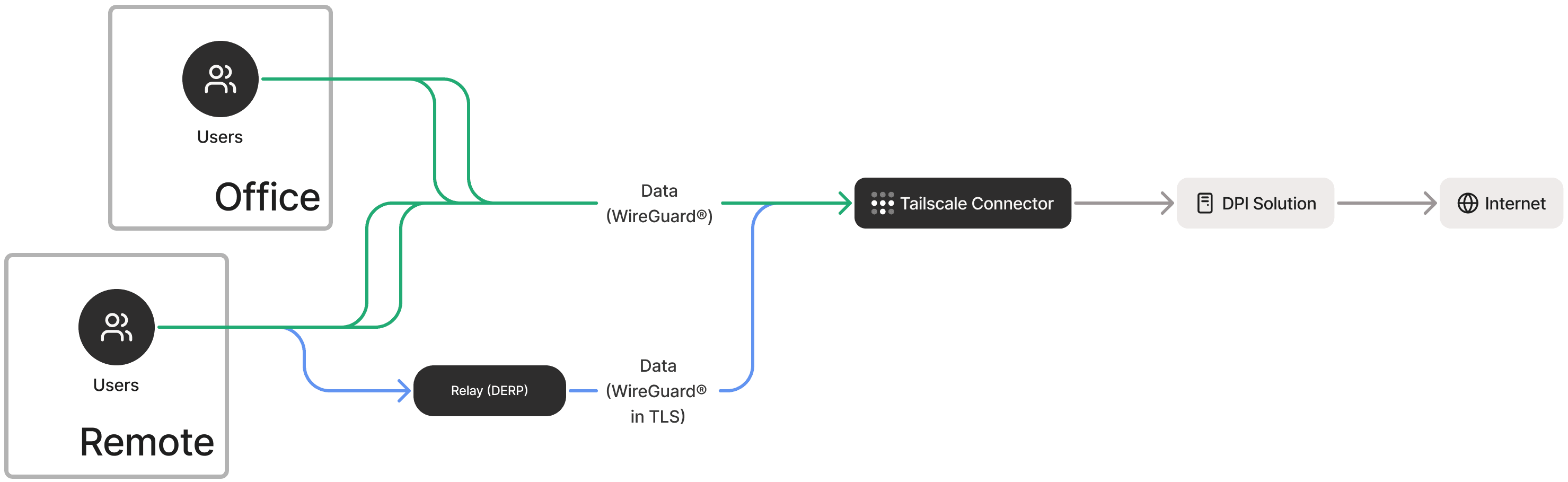
The diagram above illustrates a Tailscale exit node forwarding traffic to a third-party DPI solution for inspection before sending it to the internet.
Prerequisites
Before you begin, ensure you have the following:
- A Tailscale account and a configured Tailscale network (known as a tailnet).
- A tailnet device you can configure as an exit node.
- A third-party DPI solution that can accept forwarded traffic.
- Basic knowledge of networking concepts and Linux command line.
The instructions below were verified on Ubuntu 24.04. The commands might vary for other distributions and versions.
After you ensure you have the prerequisites, follow the steps below to set up your Tailscale exit node to forward traffic to your DPI solution.
Step 1: Set up an exit node
The first step is to configure a device in the tailnet as a Tailscale exit node with IP forwarding enabled. This device will receive traffic from Tailscale clients and forward it to your DPI solution.
Refer to the quickstart guide for exit nodes for detailed instructions on setting up an exit node.
After setting up the exit node, the next step is to configure the exit node to forward traffic to your DPI solution.
Step 2: Forward traffic to your DPI solution
Next, configure the exit node to forward traffic to the listener of your DPI solution by setting up appropriate firewall rules and enabling network address translation (NAT). The example below uses iptables to forward HTTP and HTTPS traffic to a DPI solution. You can modify the commands to include all protocols and ports you need to inspect.
Make sure to replace $TAILSCALE_INTERFACE with your Tailscale interface name (typically tailscale0) and replace $ETH_INTERFACE with the interface name of the network interface that you plan to use to connect to your DPI solution (usually ens5 or similar).
-
On the device you configured as the exit node, use the
iptablescommand to forward traffic to your DPI solution. Make sure to replace$DPI_ADDRESSwith the IP address and port of your DPI solution in the formaddress:port, such as10.120.0.10:8080.sudo iptables -t nat -A PREROUTING -i $TAILSCALE_INTERFACE -p tcp --dport 80 -j DNAT --to-destination $DPI_ADDRESS sudo iptables -t nat -A PREROUTING -i $TAILSCALE_INTERFACE -p tcp --dport 443 -j DNAT --to-destination $DPI_ADDRESS -
Enable network address translation (NAT) for the forwarded traffic.
sudo iptables -t nat -A POSTROUTING -o $TAILSCALE_INTERFACE -j MASQUERADE -
Allow forwarding from Tailscale to your local area network (LAN) and only allow return traffic back. Running these commands makes it so that Tailscale clients can reach the main network (or the internet) using the exit node. It also permits return traffic for established sessions while blocking unsolicited inbound connections.
sudo iptables -A FORWARD -i $TAILSCALE_INTERFACE -o $ETH_INTERFACE -j ACCEPT sudo iptables -A FORWARD -i $ETH_INTERFACE -o $TAILSCALE_INTERFACE -m state --state RELATED,ESTABLISHED -j ACCEPT -
Save the forwarding rules to persist this configuration across reboots.
sudo iptables-save | sudo tee /etc/iptables/rules.v4
The exit node now forwards traffic to your DPI solution. Next, ensure your DPI solution is configured to inspect the forwarded traffic and verify that inspection is working as expected.
Step 3: Configure of your DPI solution and verify inspection
Some DPI solutions require additional configuration on end-user devices, such as installing and trusting additional certificates. Refer to your DPI solution's documentation to complete any required configuration, then verify you're able to inspect traffic as expected.
Limitations
Keep the following limitations in mind when using exit nodes to forward traffic to a third-party DPI solution:
- Tailscale operates as a split tunnel VPN. When clients are configured to use an exit node, the default route for public internet traffic is through the exit node. However, app connector and subnet router traffic does not go through the exit node and is not be processed by the setup described in this document. To inspect app connector and subnet router traffic, you must configure each app connector and subnet router to forward traffic to your DPI solution.
- This approach deploys a Tailscale exit node with source network address translation (SNAT) enabled, which means all outbound traffic is translated to the local IP address of the exit node. As a result, all traffic appears as originating from the exit node rather than the original client device.
If you require visibility into the actual end-user IP address (the Tailscale CGNAT address in the
100.64.0.0/10range), you must configure the exit node with SNAT disabled. When SNAT is disabled, the DPI solution must be able to route traffic back to the exit node for the Tailscale CGNAT range. This typically involves adding a return route at the DPI solution to ensure that response traffic destined for Tailscale client IP addresses is forwarded back through the exit node.