Tailscale in LXC containers
Unprivileged LXC containers do not have access to the networking resource needed for Tailscale to work. This topic explains how to give it access.
Among many other uses, LXC containers are often found in Proxmox virtualization environments.
Instructions
An LXC is a lightweight way to run a virtualized Linux system. An unprivileged LXC is one where the root user (uid 0) within the container is mapped to an unprivileged user in the host system, making it possible to run an LXC more securely.
Tailscale encapsulates its frames in UDP packets and therefore doesn't require kernel modules or other privileged operations to form tunnel connections. However, it does need access to a /dev/net/tun (TUN) device which unprivileged containers usually do not provide.
To bring up Tailscale in an unprivileged container, you can enable access to the /dev/net/tun device through the user interface:
-
Create your LXC container.
-
Go to the Resources tab of the container.
-
Select Add. Then select Device Passthrough.
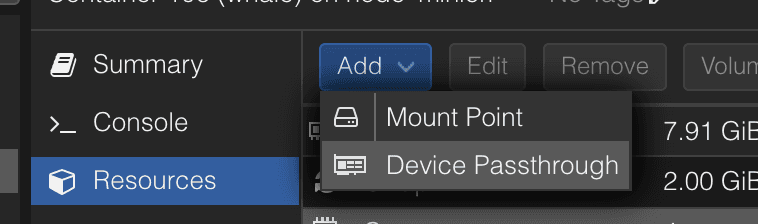
-
On the Add Device prompt, enter
/dev/net/tunin the Device Path field and select Add.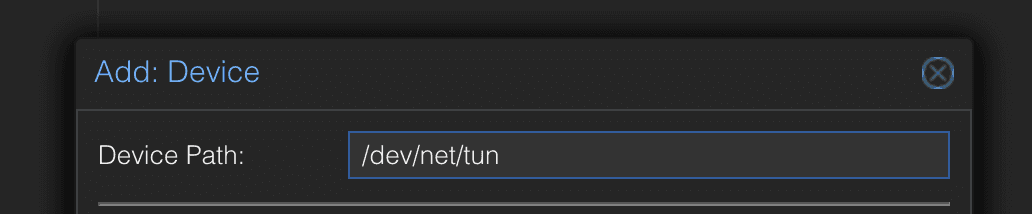
-
If the container is running, shut it down and start it up again.
-
Once
/dev/net/tunis available, the Tailscale Linux package can be installed in the system running within the LXC.
Alternatively, if you don't want to grant /dev/net/tun access, you can use userspace networking mode which avoids the need for any administrative access at all.
FAQ
Proxmox Container Tools
An alternative method for adding the TUN device and additional permissions to the LXC container is with the pct set command.
pct set CTID --dev0 /dev/net/tun
pct set CTID --features keyctl=1,nesting=1
Providing access for Proxmox 7
In versions without user interface support, you can enable access to the /dev/net/tun device in the configuration for the LXC. For example, using Proxmox 7.0 to host as unprivileged LXC with ID 112, the following lines would be added to /etc/pve/lxc/112.conf:
lxc.cgroup2.devices.allow: c 10:200 rwm
lxc.mount.entry: /dev/net/tun dev/net/tun none bind,create=file
If the LXC is already running it will need to be shut down and started again for this change to take effect.
Providing access for Proxmox 6 and earlier
Use the cgroup environment (instead of the Proxmox 7 cgroup2 environment):
lxc.cgroup.devices.allow: c 10:200 rwm
lxc.mount.entry: /dev/net/tun dev/net/tun none bind,create=file
If you don't want to enable /dev/net/tun access, remove the lxc.mount.entry: line.
CentOS 7 and Ubuntu 16.x still have no /dev/net/tun in Proxmox 7.0
Proxmox has a guide for containers with a systemd too old to understand cgroup2.