 Andrew Cunningham
Earlier this month, Meta announced Muse, the company’s new personal AI agent. Meta’s pitch for Muse is that it “helps people stay on top of things, takes tasks and projects off their plate, and turns long-term goals into action plans,” and that “it actually does the work” instead of simply answering users’ questions.
A large part of the announcement (and a related architecture post) focused on Meta’s work to secure Muse and guard against prompt injection and data exfiltration, two common AI vulnerabilities. The agent runs in a Linux virtual machine, walled off from both user data and external services by default, with additional internal protections seeking to safeguard credentials and protect against vulnerabilities like prompt injection attacks.
This focus on security hardening is understandable, not just because of widespread skepticism about AI, but because agents can be incredibly dangerous when they can see and do too much, while connected to sensitive data. In some circles, that’s called the “lethal trifecta,” a problem that we built our Aperture gateway to help solve.
To avoid the lethal trifecta, an agent should not combine more than two of the following three:
- Access to private data
- Exposure to untrusted content
- The ability to communicate externally
Meta’s safeguards aim to make sure no more than two of those conditions are true at the same time.
To put boundaries on Muse’s data access, Meta has built “connectors” that give Muse access to third-party software and services without giving Muse or the apps any access they shouldn’t have. Muse has dozens of built-in connectors, and users can build custom connectors using third-party APIs to extend its capabilities even further.
Connectors exist for things like your phone’s calendar and contacts, your smart home devices, Gmail and most other Google services, Microsoft Outlook, Spotify, and (of course) Meta’s other apps. And if you’re scanning the list carefully, you might notice a familiar logo: it’s Tailscale’s!
Log in with your identity provider, and Muse joins your Tailscale network (known as a tailnet) as its own node. You sign into Muse even if you're already signed into Tailscale on your phone or laptop, because it connects separately. That's how Muse’s Tailscale integration works the same way whether you’re on the mobile app, desktop app, or the web client.
Once connected to your account, Muse can see and interact with other machines in your tailnet, expanding its utility for homelabbers. Muse can check the status of other nodes in your tailnet, integrate with self-hosted services like Immich, and can even referee a Tailscale SSH session. I used Muse to list the contents of a directory, check the status of my podman containers, and run updates on a Raspberry Pi server, using both traditional commands like ls and plain language like “check on my Podman containers.”
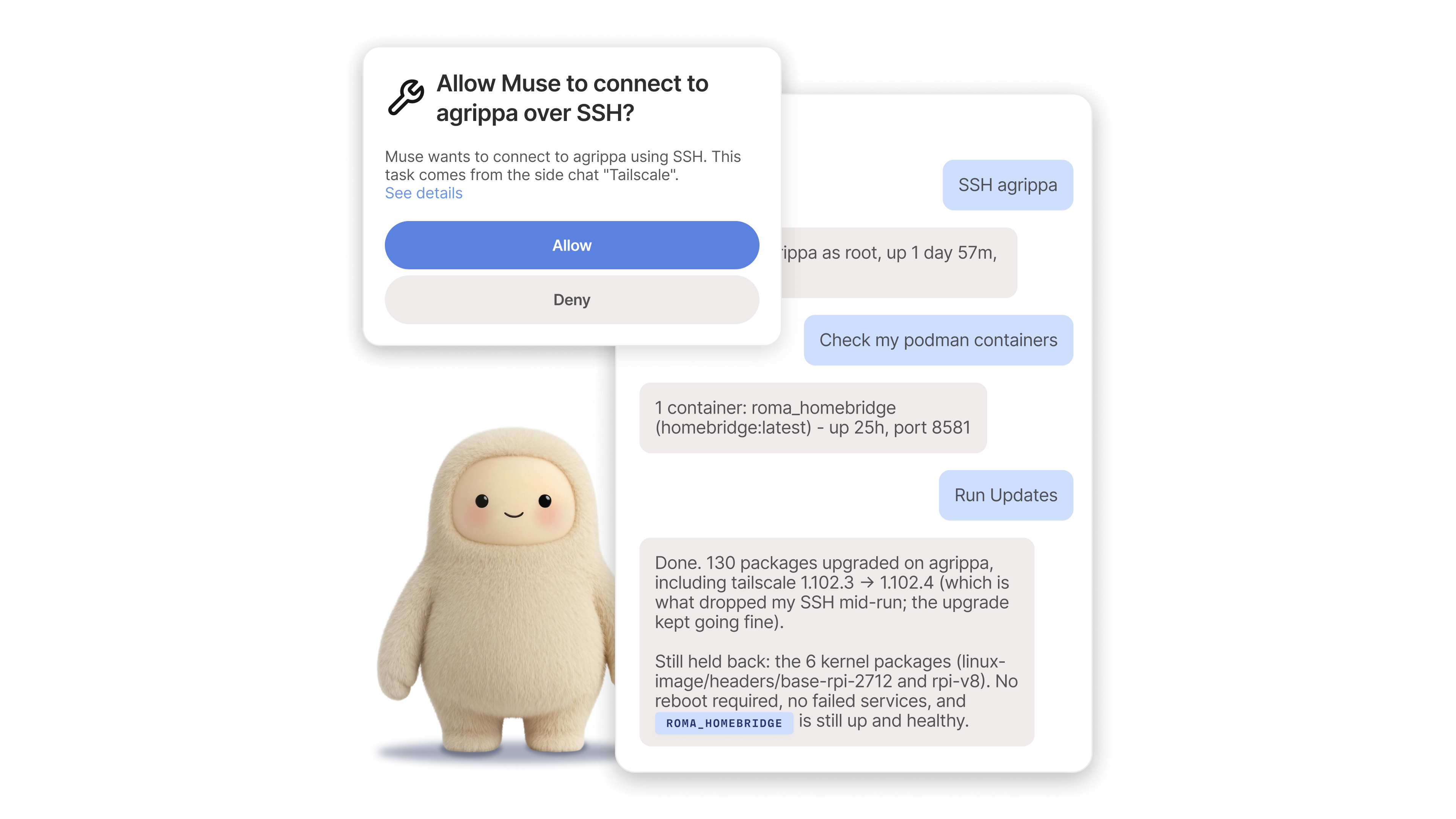
Obviously, for the security-minded, connecting an agent that can see your self-hosted services and use SSH across your tailnet raises potential concerns. Meta says Muse adheres to the “principle of least privilege,” and Muse’s Tailscale implementation does use some sensible defaults. For example, it only makes outbound connections, so other agents have fewer ways to hijack Muse. It also requires explicit confirmation the first time it connects to any tailnet device. Users can grant standing or one-time access, and revoke it at any time.
Plan for the agent to misbehave
It’s still AI, and even with precautions, things can and will go sideways. Prompt injection attacks will still slip through. Security vulnerabilities will still happen. Maybe Muse will access data that you could swear you didn’t give it access to, or go overboard communicating with someone on your behalf, or dump the secure VM’s entire filesystem when you ask (the intended behavior, apparently, but what if it’s not the user who’s doing the asking?)
Given Tailscale’s architecture, you don’t have to trust Meta’s claims if you let Muse onto your tailnet. Tailscale treats Muse like any other node, meaning our system of grants, tags, and other access controls apply like they normally would. With these, you can put up a brick wall between Muse and anything in your tailnet you’re not explicitly allowing, adding another layer of protection on top of Meta’s defaults.
Communication between Muse and the rest of your tailnet happens just like it would between any other devices. Connections are encrypted end-to-end, regardless of what physical network you’re on, and Tailscale can’t see any of the data you’re sending.
It’s safeguards like these that make Tailscale critical infrastructure for AI. Whether the chatbot or agent you’re using includes its own lethal trifecta safeguards or not, Tailscale facilitates secure communication between any devices and nodes, and the customizable rules that you set govern exactly how any agent interacts with anything else in your tailnet.
Here are a few other kinds of AI projects that Tailscale can help with:
- Tailscale can make self-hosted AI models or personal chatbots reachable while home or away, with Tailscale Serve and MagicDNS. You can add HTTPS encryption to the communication between your devices and a web interface, like Open WebUI, giving you a memorable hostname rather than an IP address.
- Our own Aperture AI gateway is now generally available. New features that went live with that rollout include purchasing tokens directly through Aperture, and using Tailscale and Tailscale SSH as Model Context Protocol (MCP) endpoints to add and access new nodes in your tailnet.
- LM Studio’s apps let you experiment with local AI models downloaded from Hugging Face. The LM Link feature lets you use your RAM-starved laptop to issue prompts to more powerful desktops. And LM Link works by using Tailscale connections to ensure you have off-network access.
- If you prefer something more hands-on and customizable than Muse (and also fewer guardrails), other agentic tools offer default and third-party Tailscale integrations. OpenClaw has one built-in, the unofficial Hermes WebUI tool recommends it, and a community package for Pi enables it.
- Tailscale offers a skill for coding agents that works with Pi and other code-focused agents. It’s in alpha as of this writing, and comes with a typical AI tool disclaimer: consider and review whatever is built with it.
Regardless of what you use, Tailscale doesn’t require re-evaluating your setup when you want to try out a tool like Muse. In your tailnet, you decide who and what can connect to which things, under which conditions, and with nothing facing the open web unless you want it that way. Tailscale puts in checks beyond any tool’s defaults, and opens up experimenting with Muse across your devices without it feeling like you’ve let something loose—however cute its mascot may appear.


