 Remy Guercio
 Andrew Dunham
Safely using AI agents can seem like a daunting, if not impossible, task. The qualities that make them so useful—access to data, the ability to take action, and the flexibility afforded by non-deterministic output—also make them dangerous. But it’s not impossible, with the right tools and a little bit of setup, to run agents and keep some peace of mind.
How do we define a safe(r) AI system?
The lethal trifecta describes three characteristics of an agentic system that, when combined, leave the system open to exploitation by an attacker. They are:
- Access to private data
- Exposure to untrusted content
- Ability to communicate externally
Using this framework, it’s not too difficult to see there are some major, intrinsic problems.
First of all, untrusted content is everywhere, from emails to web searches to support tickets to GitHub pull requests. It’s effectively impossible to avoid when doing useful AI work against your data. By their very nature, LLMs (large language models) cannot entirely ignore malicious instructions in untrusted input.
Second, LLMs are most useful when we give them access to rich personal data. What makes this such a fiendish problem is that, in their most common use as a kind of next-generation search engine, LLMs also need to communicate externally.
It’s not just that all three parts of the trifecta are dangerous when tied together. It’s that desire to make the most of your LLM in an agent. To make an agent useful, you often want exactly the kind of interplay that makes it all so dangerous.
Common “solutions” to the lethal trifecta
If combining all three elements is dangerous, how do teams deploy useful AI systems today? It’s typically in one of three ways:
- They don’t: It’s unfortunately too common to go full YOLO (you only live once) mode with your favorite harness and pay the price: deleted data, exposed personal data, new vulnerabilities, and more.
- They make the system no longer useful: Possibly just as common as YOLO mode is a system so locked down, and locked out of useful information, as to be no better than basic chat.
- They drown in permission prompts: Approve this tool call. Approve that Bash command. Approve another file write. Yes, the agent is doing work, but as soon as approval fatigue sets in, it’s yes-yes-yes, and not much better than YOLO’ing it.
Why is it so hard to address the trifecta?
Beyond the inherent relationship between usefulness and danger, it’s quite difficult to meaningfully adjust permissions afforded to an agent for each individual task. If we assume untrusted input is unavoidable, for now, it means choosing between giving our agent the ability to communicate externally, or giving it private data.
Agent harnesses let you enable or disable tools that access data, but those controls are coarse. A broad permission like “terminal access” can let an agent work around narrower restrictions. Training and guardrails can make this kind of escalation less likely, but cannot reliably prevent it. Model behavior is nondeterministic, and no safeguards can reliably stop escalations entirely.
Using an AI gateway to mitigate the lethal trifecta
Using Aperture’s combined LLM and MCP (model context protocol) gateway, along with Tailscale’s identity-based mesh network, it’s possible to mitigate the issues with harnesses and model-based controls. And it can do all of this without sacrificing the user experience or annoying users to the point of giving up or going around.
The first step many people have taken is putting the agent in a sandbox, or contained development environment. Local or remote, the sandboxes end up with the same problem. It’s great to start off away from the user’s primary machine, but real-world utility makes agents want access to data and external communication abilities. Now they’re a clone of the user’s primary machine again.
Aperture’s gateway helps prevent this unintentional cloning process. Aperture can decouple the agent’s access to both the data and the LLM, and mark and control the connectivity of the sandbox environment running those agentic systems. Here’s how it works.

Configuring the Aperture Gateway
Mitigating the lethal trifecta involves two features of the Aperture Gateway, as well as device postures from Tailscale ACLs.
First, you’ll need to configure all of the MCP and API endpoints that you’d like your agent to be able to access as connectors in Aperture. After configuring each connector, you apply a label to each one, indicating whether it contains sensitive data. In our case we use hasCustomerData and noCustomerData as the label names.
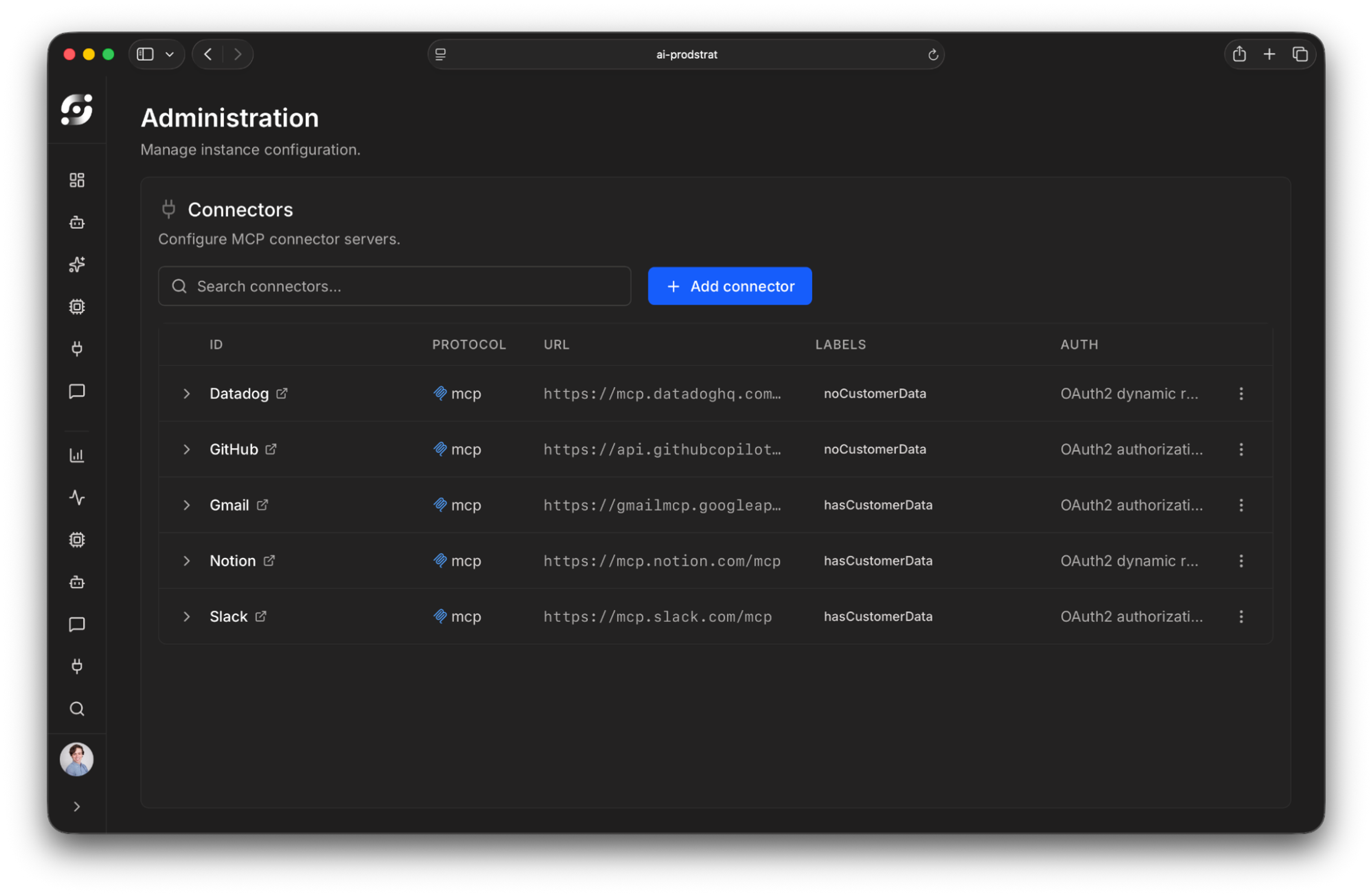
Once configured, if you’re using OAuth for MCP authentication (the typical choice), users will need to authenticate to each endpoint as themselves. The good news is that once they’re authenticated in Aperture, each connector will be available (if allowed) wherever Aperture has been added as an MCP server. No need to reauthenticate each time in the Chat UI, Claude Code, Codex, or any other agent. It’s all managed in Aperture.
Configuring device posture attributes and application capability grants
Now that each connector now has a label indicating whether it contains sensitive data, we can tackle the next leg of the trifecta using device posture attributes. Device posture attributes are a way of marking a device (or sandbox) in Tailscale with extra metadata that controls how Aperture behaves. We’ll use them here to mark sandboxes that have unrestricted egress to the internet.
Start by defining the postures. A posture is the predicate that says: “if the following posture attributes are set to the given values, then the posture is met”:
"postures": {
  "posture:hasEgress": ["custom:hasEgress == true"],
  "posture:noEgress":  ["custom:hasEgress == false"],
}
Next, use that, plus application capability grants, to control which permissions a device has in Aperture:
"grants": [
	// This rule states that users on a device that has no internet
	// egress are allowed to access both connectors that have customer
	// data and connectors that don't
	{
		"src":        ["autogroup:member"],   // who gets access
		"srcPosture": ["posture:noEgress"],   // when they get access
		"dst":        ["tag:aperture"],       // what they get access to

		// Pass application capabilities to Aperture that tell it
		// what connectors this device can use.
		"app": {
			"tailscale.com/cap/aperture": [
				{"connectors": [
                  "label:noCustomerData",
                  "label:hasCustomerData"]},
			],
		},
	},

	// This rule states that users on a device that has internet
	// egress are allowed to access only connectors that don't have
	// customer data
	{
		"src":        ["autogroup:member"],
		"srcPosture": ["posture:hasEgress"],
		"dst":        ["tag:aperture"],

		"app": {
			"tailscale.com/cap/aperture": [
				{"connectors": ["label:noCustomerData"]},
			],
		},
	},
]
Automating postures for sandboxes
In order to set posture attributes on a device, Tailscale offers an API that allows setting arbitrary custom attributes. However, there’s an even simpler way: using our device provisioning with OAuth apps feature, you can let a user generate a new single-use auth key, and ensure the key applies a posture attribute to the device on creation such that the user can’t influence it.
Using this, you can allow users to launch sandboxes (or any other device) with a preset posture attribute, controlling what they have access to, all while retaining their Tailscale identity:

We’ve written a small demo app and associated Terraform script to show how this can work in an AWS environment with Tailscale and Aperture. We encourage you to experiment with this example in your environment, and to let us know at aperture@tailscale.com if you have any questions or ideas.
Putting it together to keep the trifecta apart
Now we have everything configured: Aperture knows which sandboxes have unrestricted egress, and which connectors have sensitive data. Using this, Aperture can automatically shut off the appropriate data access before it even gets to the sandbox or harness. Not only that, but it becomes extremely difficult for an agent to work around this. Because Aperture holds the keys for LLM, data, and MCP access outside the harness, the agent has fewer opportunities to bypass these controls.
A note on the threat model we’ve worked through: this setup is intended to prevent an agent, maliciously driven by an outside actor, from leaking sensitive data. It is not intended to prevent a malicious insider (especially one that is already a Tailscale admin) from intentionally trying to leak sensitive information.
Wrapping things up
We’re just getting started down the path of making the lethal trifecta something users don’t need to think about, while still offering peace of mind to administrators. Over the coming weeks and months we’ll continue to make it easier to apply this pattern across any sandbox provider, MCP server or tool, API, and LLM provider. Sign up for Aperture today and try it out for yourself.


