 Kevin Purdy
OpenClaw, the AI agent you can run on your own hardware or a virtual private server (VPS), is quite fun and extremely dangerous. The two are inseparable.
OpenClaw, by default, has broad access to your system—shell, files, and network—and eagerly reaches out to external APIs. It makes decisions from messy, multi-channel input. It behaves nondeterministically, may run commands you didn’t explicitly request, and can burn tokens like they’re about to go bad.
That same autonomy is what makes it useful—and unpredictable. For most people, running OpenClaw without a solid understanding of the risks is a serious risk.
But we know lots of you are running OpenClaw anyways, because you’re using Tailscale to connect to your volatile little lobsters. We appreciate the introduction, but we’re not going to pretend we can make OpenClaw “safe.” What we can do is remove a few sharp edges—and give you more visibility and control over what it’s doing.
One way is by using Aperture, our AI gateway that drastically reduces API key leakage and provides better insight into what OpenClaw is doing. The other is using the right kind of Tailscale connection.
Today the hot and risky thing is named OpenClaw; tomorrow it might be Nvidia’s NemoClaw, or something else entirely. This stuff is evolving fast; we’re learning how it all works, and what the dangers are, right alongside everybody else.
Preventing key leaks
OpenClaw’s default onboarding experience asks for an API key from an LLM provider (like OpenAI or Anthropic) and stores it in a plaintext JSON file. You can dig in and learn how to turn on “SecretRefs,” or use an .env file, but plaintext is what you get when you rush in. That’s not great, because config files can be accidentally committed or shared, and keys get leaked through prompt injections.
Aperture by Tailscale, now available for self-service install on all plans (with or without an existing tailnet), changes this. It removes the need to store sensitive LLM or MCP credentials on the machine where OpenClaw has free rein. Aperture also makes it easier to switch between multiple LLM models, without adding even more keys.
 "models": {
   "providers": {
     "aperture": {
       "baseUrl": "http://YOUR-APERTURE-URL.net",
       "apiKey": "-",
       "api": "anthropic-messages",
       "models": [
         {
           "id": "claude-sonnet-4-6",
           "name": "Claude Sonnet 4.6"
         }
       ]
     }
   }
 },
The above code sample is how I set up Aperture inside Openclaw (openclaw.json) and managed OpenClaw’s LLM access through it (with Anthropic’s Claude Sonnet 4.6 model chosen here).
Aperture is currently in alpha and runs as a hosted service managed by Tailscale. That means request logs and usage data are processed on Tailscale infrastructure so you can see tool calls, tokens, and costs. We don't use that data for model training or anything beyond operating the service. As Aperture develops, we plan to offer more granular controls, including configurable log retention and export options.
Seeing tool calls and setting cost quotas: an experiment
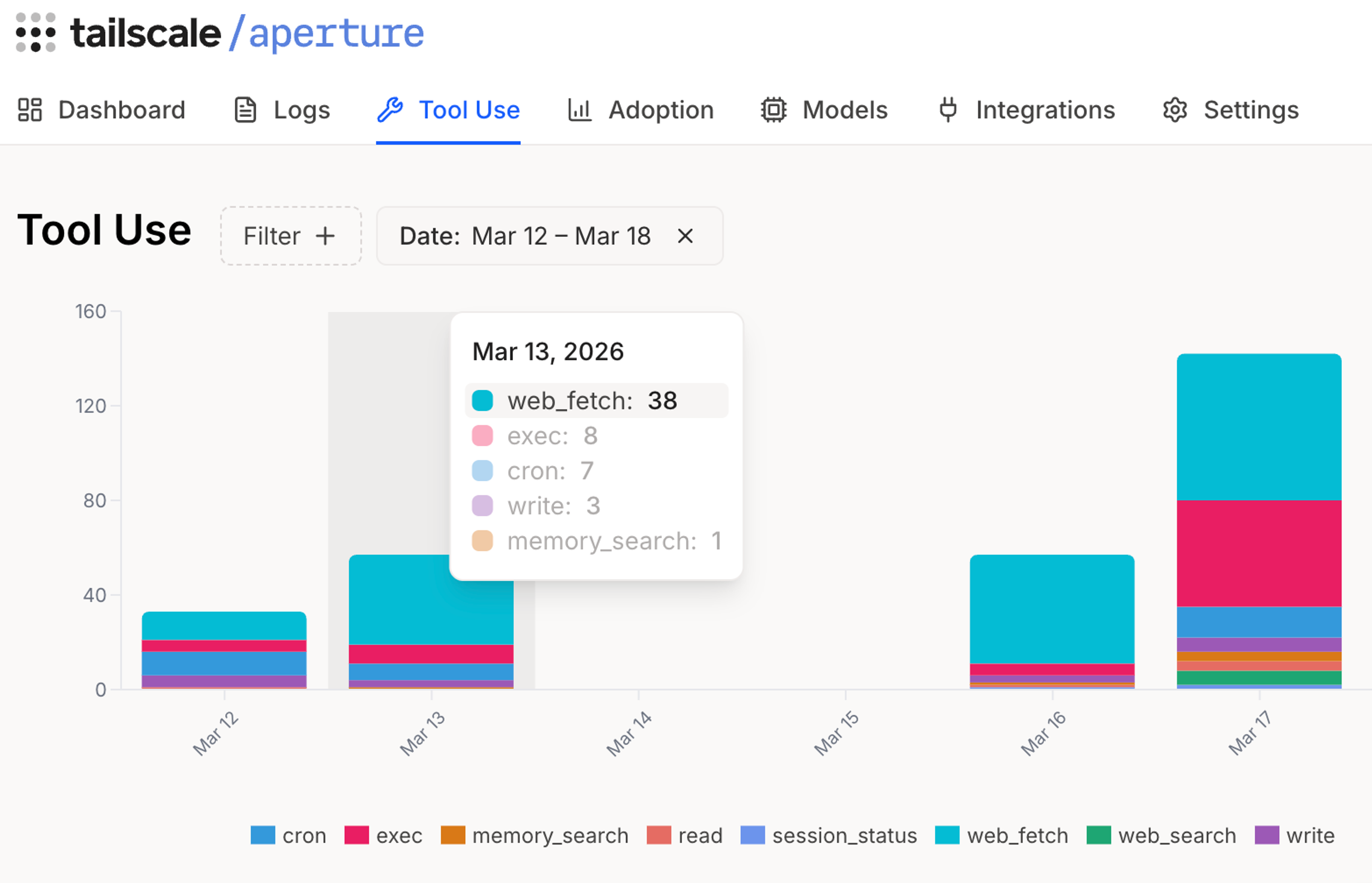
By making Aperture your provider of AI access, you’re also giving yourself insight into what OpenClaw is doing with all your tokens. How much OpenClaw will cost you to run can see like a vague “it depends” scenario. But Aperture can help with:
- Seeing how much each action costs
- Tracking which tools OpenClaw calls
- Logging each request: models and tokens used (input/output/cached/reasoning)
- Setting spending limits
That last one, setting token/cost quotas, is a just-added feature to Aperture. You can set daily, hourly, total, or per-model cost caps (buckets) and refill rates. If a request's estimated cost would put a bucket below zero, that request is rejected.
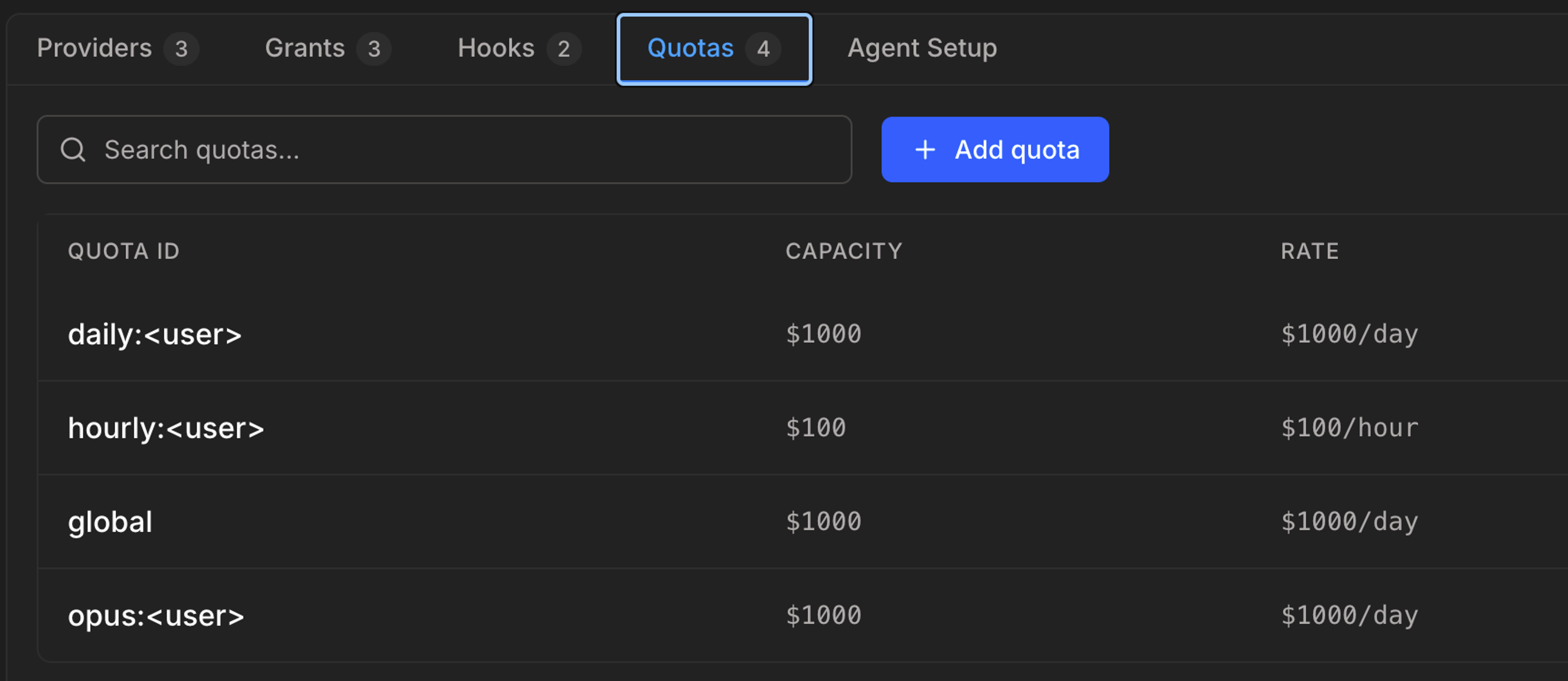
I set up OpenClaw on an isolated cloud workstation for a few days, routed through Aperture and only accessible through SSH on my tailnet. I gave it no keys, no company data, and no messaging access. It had one job: act as a news-gathering intern, summarizing RSS feeds and comments on sites like Hacker News and GitHub for Tailscale-relevant bits.
This is about as boring, and controlled, a use case as you can get: public data, no identity, no external access. And yet it was still nowhere near “safe,” because I was sending it out to ingest whatever it found on the web.
OpenClaw was unpredictable, just not how I expected. Most analysis runs cost $0.02-$0.10 using Claude Sonnet 4.6 (I’d use Haiku next time). But a few passes cost up to $0.51. On average, my three daily news and sentiment scans cost $7 per day—mildly useful, but not quite worth a recurring light-roast-Ethiopian-pour-over cost.
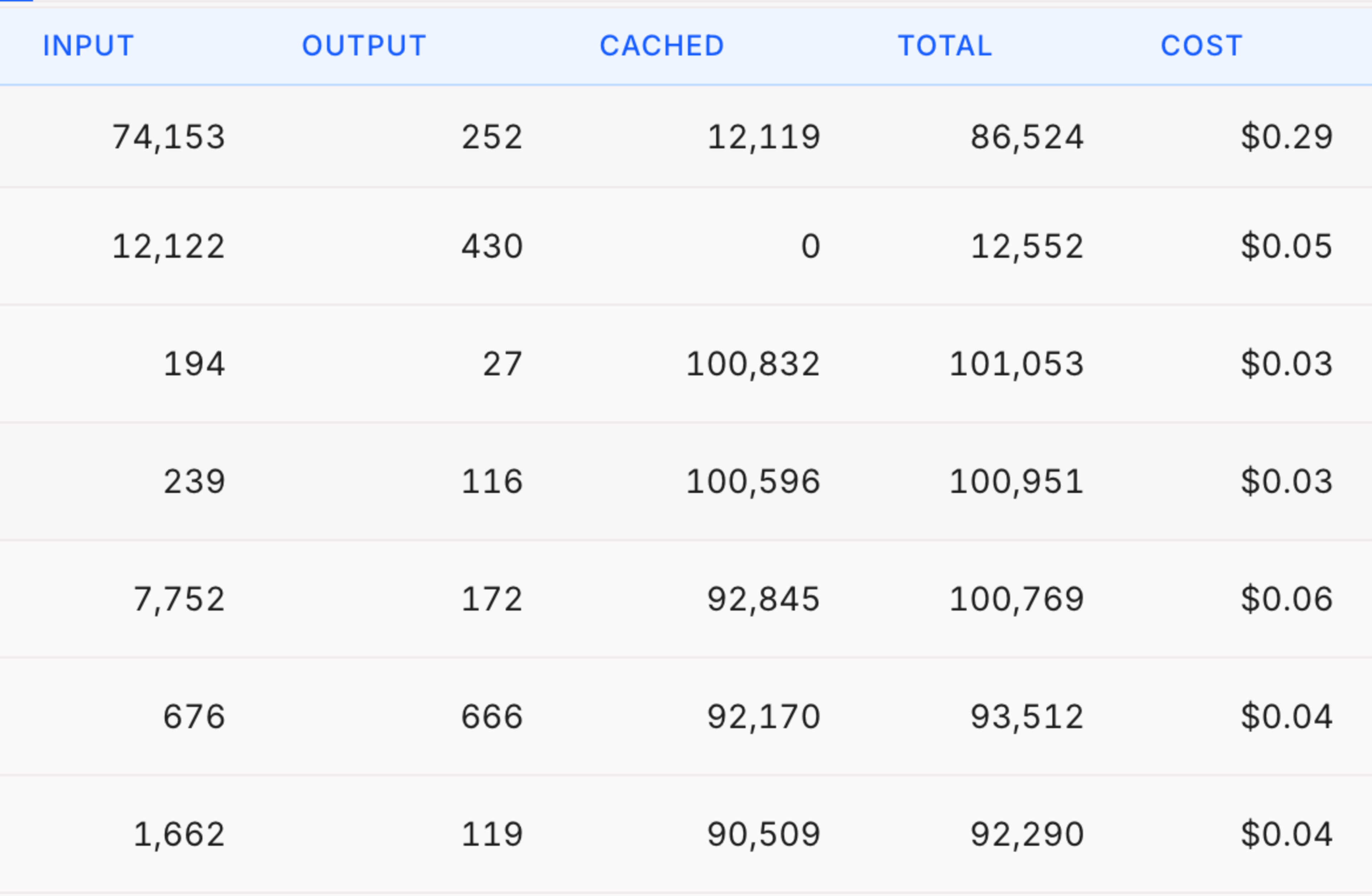
That’s one person, one agent, one model, on a schedule—and there were still surprises. Aperture’s visibility becomes far more useful when you scale that up across teams, tools, and models. Imagine running it with something far more fitting than OpenClaw!
Connecting to danger (please don’t Funnel your OpenClaw)
If you take one piece of advice from this post, let it be this: do not expose OpenClaw to the public internet with funnel.
During OpenClaw’s onboarding process, you are asked about “Tailscale exposure,” set to “off” by default. You can turn Tailscale exposure on through two working modes, “serve” and “funnel.”
Funnel is meant for small webapps, servers, and custom software that you need to expose to the open web. Think “Testing out a webapp with a few people outside my organization," or “Serving up a public web page from a container that doesn’t touch sensitive data.” It is not meant for “Anyone can reach my AI agent, with access to my personal data, stuffed with credentials, with just a password.” We now proactively notify Tailscale users with claw-named funnel setups about the hazards of doing this.
If you’re going to stand up an OpenClaw instance, use serve. A serve URL can only be reached by devices connected to your tailnet. This removes one of the easiest ways things can go very wrong. Now you and your lobster are free to cause things to go wrong by yourselves, in your own private sandbox.
The first catch out of the cage
OpenClaw is still popular and growing weeks after its debut; we see it in our traffic. There will be more OpenClaws. All the agents out there will keep improving. And people are going to keep building things that are fun and fiendishly hard to control.
We can’t change that, but we can help you connect to them more safely, and see what they're actually doing along the way.


