 Kevin Purdy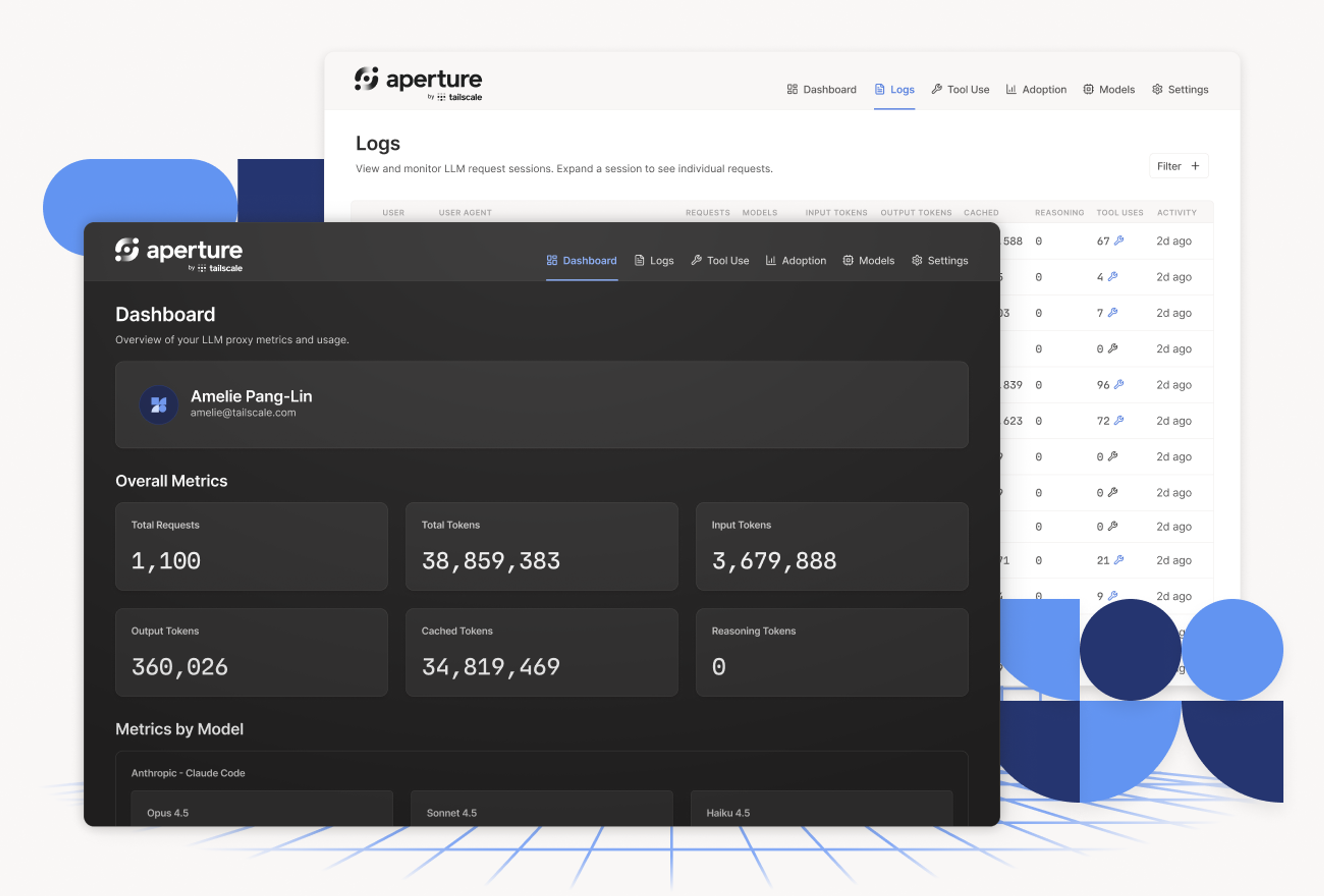
31 cents seems like a lot to pay just to send “Good evening” to Claude Code, even if there are reasons for it. But $3.29 for a personalized B-minus copy of Rampart, running in a browser? I can see that.
Those are the current token costs you might pay Anthropic for its coding assistance. If you pay $20 per month for a Claude Pro or ChatGPT subscription—or your company pays even more per-seat for team subscriptions—you don’t see the costs, unless you go looking for them. I know these numbers because I started using Claude Code through Aperture, Tailscale’s gateway for managing LLM use—which now works with subscription logins, not just API keys.
Why track your coding costs through Aperture? Right now, a flat monthly fee buys a mostly unknown amount of computing, subsidized by lighter users and a great deal of venture capital. You’re never quite sure how good a deal you’re getting. Anthropic provides a usage-limit progress bar and per-session tools, while OpenAI offers next to nothing.
The economics of this arrangement seem increasingly temporary. When the inevitable repricing happens—like it already has for organizations above Anthropic's 150-seat Team limit—people who know their token math can make an informed decision, based on their real usage and needs. Everyone else does a gym-membership-style guessing game, whether for themselves or dozens of employees.
Tracking your own coding receipts takes less than 15 minutes. Once you’re set up, you’ll almost certainly find other tools in Aperture useful, too, whether for subscriptions or other AI usage.
Connect your subscription to Aperture
Let’s set up Aperture to handle access to an Anthropic Pro subscription to use Claude Code. If you use ChatGPT/Codex, the process is much the same. We have documentation on setting up both Anthropic/Claude and ChatGPT/Codex.
First, add Aperture on your tailnet. Provide your email address on Aperture’s signup form (company name is optional), then follow the prompts. You’ll end up with a web address you can reach on your tailnet URL, with ai as the default. So if your tailnet was assigned silly-pangolin.ts.net, your Aperture instance would live at https://ai.silly-pangolin.ts.net (presuming you have HTTPS enabled for your tailnet; otherwise it starts with http). Open your Aperture URL in a browser while signed into Tailscale.
If you're setting up a new Aperture instance, Anthropic and OpenAI subscriptions are automatically configured for you. If you created your Aperture instance earlier this year and have not set up subscription providers yet, go to the Administration section of your My Aperture configuration section, head into Providers, and choose OpenAI (Subscription) or Anthropic (Subscription), and the fields are filled out for you.
Aperture should provide the most commonly used models in the Models section, using exact names like claude-sonnet-4-6; add anything else you want specifically in there. Select Save and you’re most of the way there.
Connecting a coding agent
We’re now going to set up Claude Code to send its requests and authorization through Aperture, rather than its default flow that goes straight to Anthropic.
First, log in. If you haven’t set up Claude Code before, install it, launch a terminal window, start Claude Code with claude, answer the prompts about directories and safety, and you’ll land at a Claude Code prompt. Enter /login, and log into your Anthropic account through the browser tab that pops up (or copy and paste the URL and resulting code).
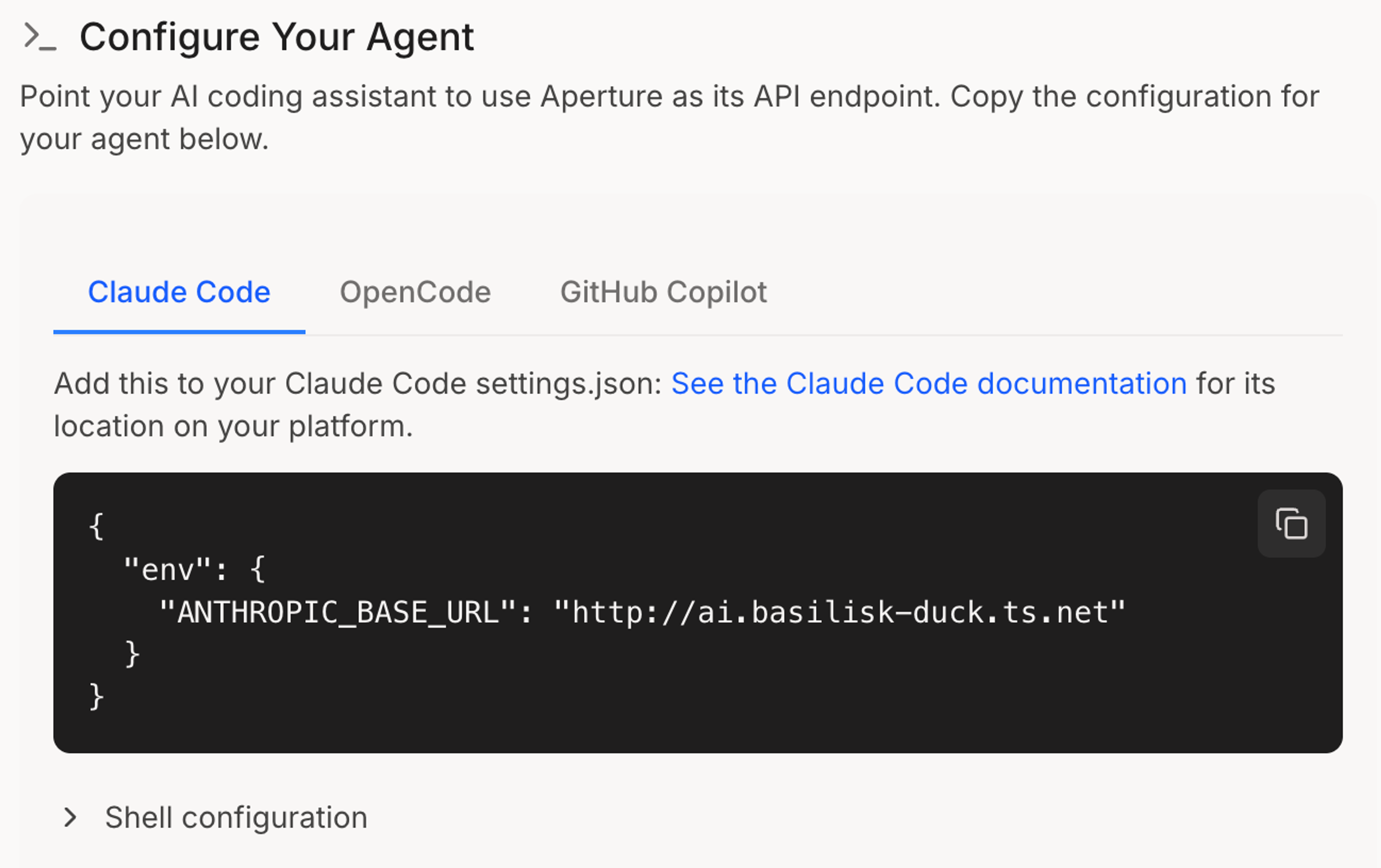
Once you’ve logged in, you need to edit one file, to add your Aperture hostname. Using silly-pangolin.ts.net as an example, we’ll edit ~/.claude/settings.json to provide our Aperture gateway (~/.codex/config.toml for ChatGPT). Note that base URL is specifically http, to avoid unexpected TLS issues; the traffic remains encrypted.
{
 "env": {
    "ANTHROPIC_BASE_URL": "http://ai.silly-pangolin.ts.net"
  }
}
You can do this a few ways:
- With your file browser, by revealing the hidden `.claude` folder in your user folder and opening it with Notepad, TextEdit, or another text editor
- With a code editor like Visual Studio Code
- Inside the terminal itself:
nano ~/.claude/settings.json, edit the file, then Control+O to “WriteOut” (save), and Control+X to exit.
If you have other variables set in your settings.json, you can leave them be. If there is an API key, remove that line, making sure there is a comma after every line, except the last.
Now test your connection. Run claude from a directory you want to work in (or just your home directory). Give it a test prompt. If it responds, it’s likely working, but let’s double-check. Head into your Aperture dashboard, down to Logs, and look for your test prompt. In my case, using Claude Code and sending a single-line chat, it’s broken down into a session with three parts:
- An authentication bit sent to Anthropic via Aperture
- My message (“Good evening?”) and some of Claude Code’s session-opening framing (“Generate a concise, sentence-case title … describe what the user is asking about … ”) sent along with it
- The response: A humongous wall of text sent to Anthropic that essentially tells it how Claude Code works, and then the response: “Good evening! What are you working on?”
This little cordiality to Claude would have cost 31 cents, according to Aperture. But Aperture also showed me why. The first request of every session pays full price to write Claude Code’s enormous system prompt into the cache, setting it down for every following request. Token math is tricky, so I’m glad to have something else doing a lot of it for me.
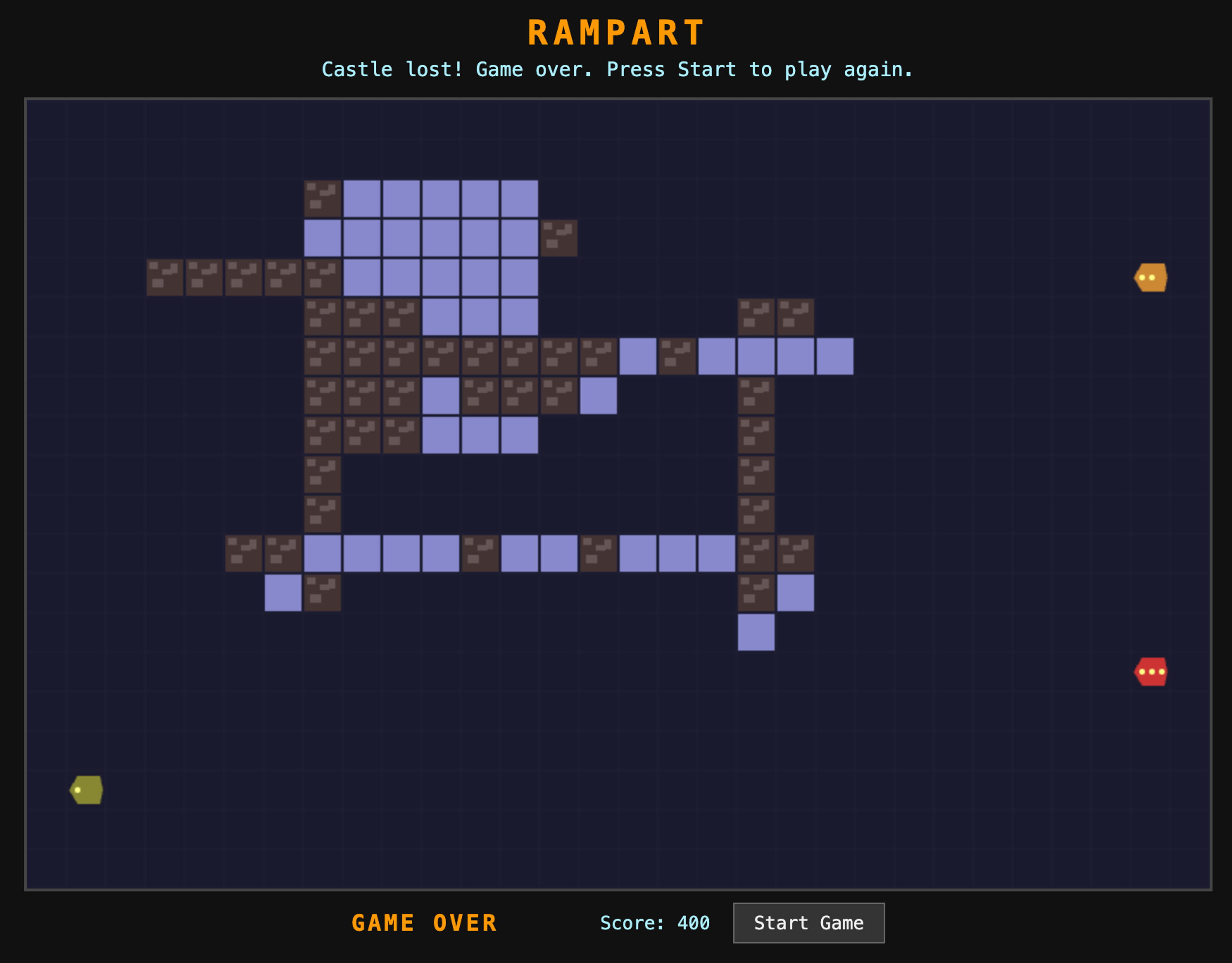
With those introductory sunk costs in place, the next logical step was, obviously, asking Claude Code to build me a browser-based version of the arcade classic Rampart. How much would it cost to whip up a simulacrum of that progenitor of the tower defense genre, the one with a bit of Tetris mixed in?
What you can do: see what models actually do (and cost)
I went a few rounds with Claude Code, refining the gameplay until it almost matched my memories of long summer afternoons with the NES version of Rampart. The agent told me my initial scope, with a full two-player mode that used tsnet for authentication, would have been a “weekend-to-week project.” So I stuck with a single-player game, with just-above-Atari-level graphics and gameplay that I kept revising until it felt like a reasonable approximation.
How much did this cost? On a Claude Pro subscription, there is only one answer, for now: $20, every month, unless you go over your limits and spend optional “Usage credits” you keep topped up. Was I close to that line? I can type /usage into Claude Code and see the actual costs and token use, but just for this one session.
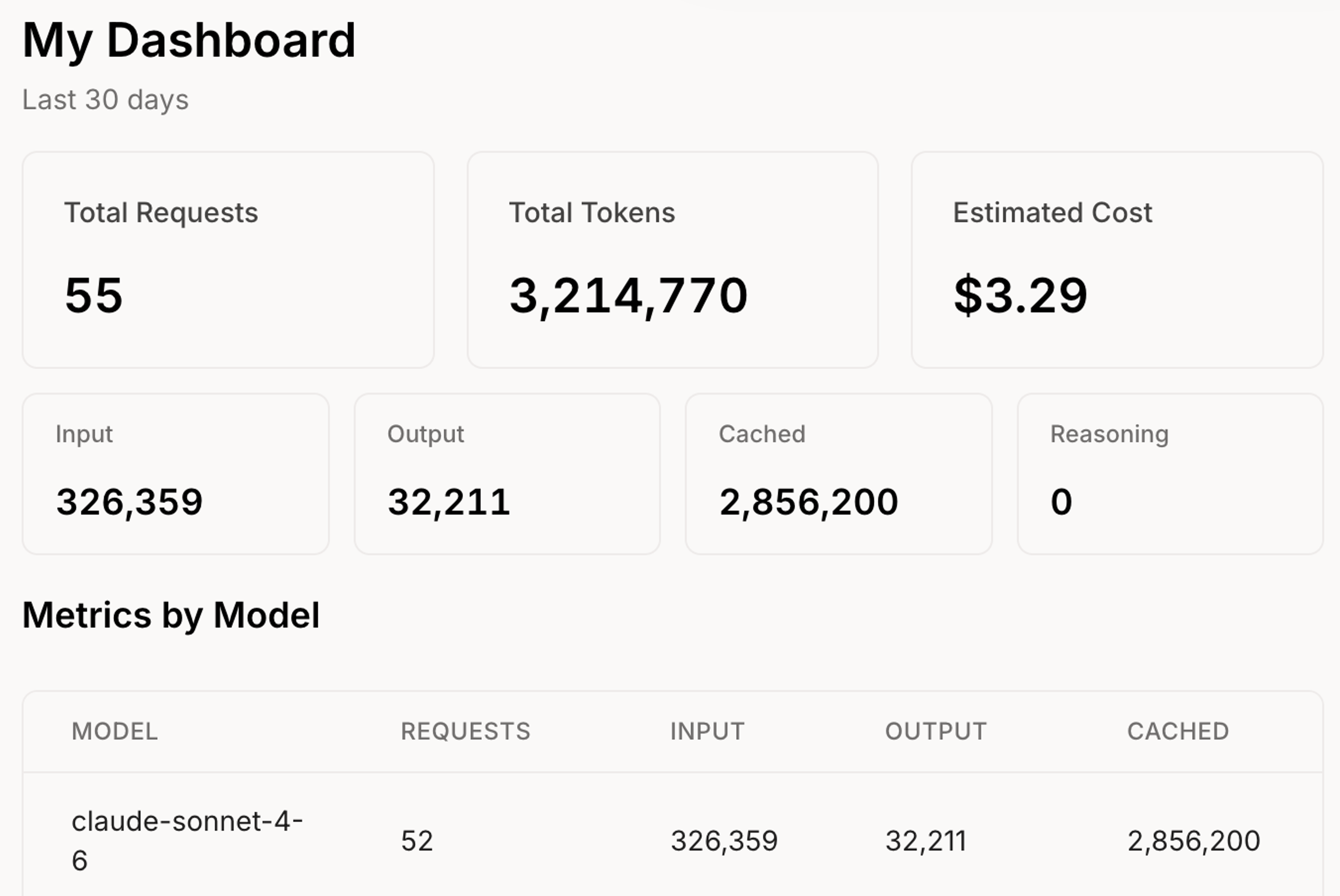
You could install any number of third-party trackers, like ccusage, that can track your token-per-turn data. But those are per-device tools you have to set up. Aperture, once authorized, can track all your sessions, models, devices, agents, and whatever else you connect, and make it all make sense at a glance.
My Rampart project, on Claude’s Sonnet 4.6, was 47 requests, 326,359 input tokens, 32,211 output tokens, with 2.85M tokens cached. It would have cost me $3.29 if I was using prepaid or usage credit tokens.
That same week, I went deep on a complex home automation project—cable-running, hardware buying, container setup, a whole deal. I stuck with Claude’s Opus model for most of it, never compacted or created new sessions, filled the context window beyond 150K, used a lot of MCP tools, and burned a hypothetical $32.76. This revealed some … skill issues, let's say, along with more context for future subscription renewals.
Now imagine that $3-or-maybe-$32 spread across every seat on a Team plan.
What Aperture adds to coding agent subscriptions
If you’ve set up Aperture on your tailnet, and set up a passthrough provider for Anthropic or OpenAI, you can make use of a number of Aperture features, beyond the token and cost tracking:
- Set up guardrails to prevent personal information, keys, or anything you want from going to LLM providers
- Pick which models you do and do not want your coding agents to use
- Set up connectors and MCP tools for all your coding agents to use
- Add your local AI models, and API-based cloud models, to Aperture, making them easy to switch between on any connected system
Aperture has a lot more to offer if you get into API-based usage: setting up and controlling agents, a multi-provider chat interface, setting up cost and model-use quotas, and more. It's particularly useful for teams looking at token-based pricing (whether on their own or due to seat limits), providing quotas, per-team budgets, and detailed audit logs. Seeing how much you save, or not, from a subscription model might just compel you to explore your options.
What you can’t do: sneak around usage rules
You and I, reader? We’re honest types. But there are some people who might see “A single endpoint for access to your Anthropic subscription” and think, “Ah, I know some off-the-books ways that could be useful.” Straight talk: those ways will not work.
During our setup, we set our mode to passthrough and logged into an Anthropic account using the /login command. That login credential is the thing getting passed through. Anyone else who tried to use Claude Code or Codex with your Aperture endpoint would, for starters, have to be on your tailnet. Even if they were, they would then have to sign into the associated Anthropic or OpenAI account. Their logs would get mixed with yours, and Aperture doesn't add anything.
What about using Aperture to load your subscription into third-party tools and harnesses? Aperture isn’t designed for that, and it is, generally, a violation of both Anthropic and OpenAI’s terms of service for their subscriptions. Anthropic has gone back and forth on third-party usage a few times, but ultimately prioritizes use of its own tools. OpenAI, for its part, has generally allowed third-party agents and tools to access inference through ChatGPT subscriptions.
Aperture provides easier access, and better visibility, to LLM tools. It’s a gateway, not a back door.
How has Aperture proved useful for your own AI-assisted coding? Let us know on Reddit, Discord, Bluesky, X, Mastodon, or LinkedIn.


