 Alex Kretzschmar
I found myself trying to explain what an agentic workflow actually was to a friend the other day. In that moment, I realized I didn't really know. Agents, harnesses, runtimes, workflows, gateways, memory, tools—there are plenty of buzzwords to go around these days, and not much help for newcomers.
AI “agents” sound complicated because people use the same word to mean several different things. Sometimes they mean, simply, a model. Sometimes that model offers a coding assistant, which has some agency. Sometimes an “agent” means a workflow engine. Sometimes it means a chatbot connected to Telegram or Slack.
These things are all related, but they aren't the same thing. So let's try to make it make sense today.
What is an agent?
By now, most of us have a mental model of what a LLM (Large Language Model) is, I suspect. When you type something into a chat box, the LLM uses complex math to predict an answer, and sometimes that answer is surprisingly good (sometimes it is hilariously not good, either). On their own, LLMs, as chatbots or desktop apps, can do impressive things like explain code, summarize documents, write emails, or give you a decent first draft. But LLMs get a lot more useful when they connect to actually useful stuff, like codebases, documentation, calendars, tools, and the systems we use every day.
This is where agents come into play.
An agent is an LLM working inside a loop, with access to tools. That looping process is crucial. Instead of answering once and stopping, the system can execute a step (a script, a file lookup, etc), observe what happened, and repeat until a suitable outcome has been achieved.
A chatbot, diagnosing a misbehaving app or script, can tell you, "You should check your logs, sunshine."
An agent, given the right tool access, permissions, and context, can check the logs, read the results, and perform tasks based on the outcomes. “I analyzed your server’s hard drive temps over the last 7 days, they looked high, so I adjusted the AC schedule. I’ll monitor this in a cronjob throughout the week and if necessary adjust the HVAC systems again.”
An agent is not just the model, or the way you reach the model. An agent is the model, plus everything around it, working together as a system.
The Agent Stack
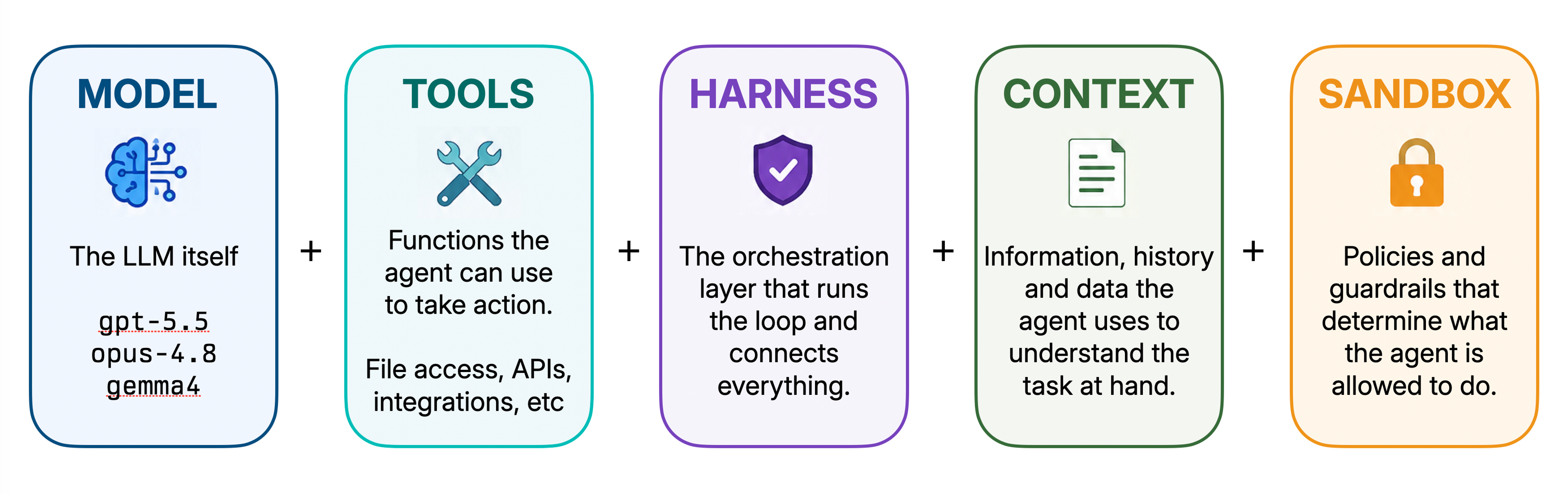
This is where the confusion really gets going for me, so let's separate the layers.
Model (LLM)
The model is the brain, of sorts. It does the reasoning and text generation. You might know models by their names and numbers, such as opus-4.8, gpt-5.5, or gemma4.
The model can explain, summarize, write, and reason, based on the context you give it (and sometimes a bit of chat history). But by itself, it doesn't know how to see your files, read your logs, access your calendars, or inspect your servers. It only knows what it was trained on, and what you put into the prompt.
Models are powerful, but on their own they are blind—and stuck in time, based on the date of their original training, typically more than a year ago. The models can talk about the world as they know it, but they cannot interact with or see it, until we give them some tools.
Tools
Tools are how a model gets access to the world around it.
- Reading the contents of a file? Tool call
- Querying a database? Tool call
- Send a chat message via Telegram, or Slack? Tool call
Without tools, the model can only send you text answers. Even in chat sessions, you might see a model search the web for information, or create a PDF—those are tool calls, too. When a tool is needed, a model should ask the user for permission. Once permission is granted, it executes the tool call within the sandbox provided.
Sandboxes
Sandboxes are a way to put the tools inside a tightly scoped box and limit what the tool call—and therefore the model—can see, examine, and do.
They are very important from a security perspective. There's quite a difference between "Here, I casually give you full shell access to read this one text file" prompt, versus "You may, just this once, run read-only, in this one specific directory".
Sandboxing can extend to all facets of tool calls, including whether a tool is allowed to talk to the internet or not, access certain files, apps, etc. Your phone runs apps in sandboxes; "Do you want to allow access to your location?" is one example of giving an app sandbox permission to access potentially sensitive data.
Runtime/Harness
You say runtime, I say harness. This is one of those confusing moments where two terms are used to mean roughly the same thing.
The harness is the machinery around the model, handling a lot of boring but important stuff. Some of the things a harness is responsible for might include:
- Prompts - Building the actual prompt sent to the model: instructions, user context, tool descriptions, and relevant history.
- Shell access - Controlling which commands can run, where they run, and what output gets returned.
- File access - Deciding which files the model can read or edit, loading their contents, and tracking any changes.
- Memory - Saving and retrieving useful context from previous interactions so the model does not start from zero every time.
Without a harness, an agent would be just a different path to sending chat-style prompts. With a harness, you give the model access to tools, memory of what it has already done, a managed loop, and much, much more.
Model access
Because an agent has these parts built outside the core model, it’s possible to use multiple models within one harness, or even switch between models midway through a task to save on costs. Doing this is a good deal easier if you have a gateway proxy.
Routing all model requests through a gateway can make access for teams (or eager-to-experiment individuals) less complicated by having a centralized location for API keys, usage tracking, and on/off-boarding purposes. The harness still manages the loops, tool calls, and memory, as you might expect. But an AI model gateway handles the concern of how those systems talk to the models, whether they are locally hosted or a cloud-based frontier model.
Aperture by Tailscale makes switching and experimenting easy by putting a secure, observable gateway between your agents and model providers. It centralizes API key management, routing, usage tracking, and access control, instead of scattering that responsibility across config files on your devices. It’s free to try out while in beta, even on Tailscale’s Personal plans.
Agent
Looking at all the pieces, at last, we're equipped to define what an agent is. Agents are this whole system working together.
Agents can seem almost human sometimes, because they work iteratively. They can inspect something, update their understanding, and try the next useful step. They take your input and requests, and seem to be figuring out how to fulfill them, complete with mistakes and backtracking as they go.
But agents are not thinking for themselves in the traditional sense. They are running a structured loop, where model outputs, tool results, context, and permissions all feed into one another.
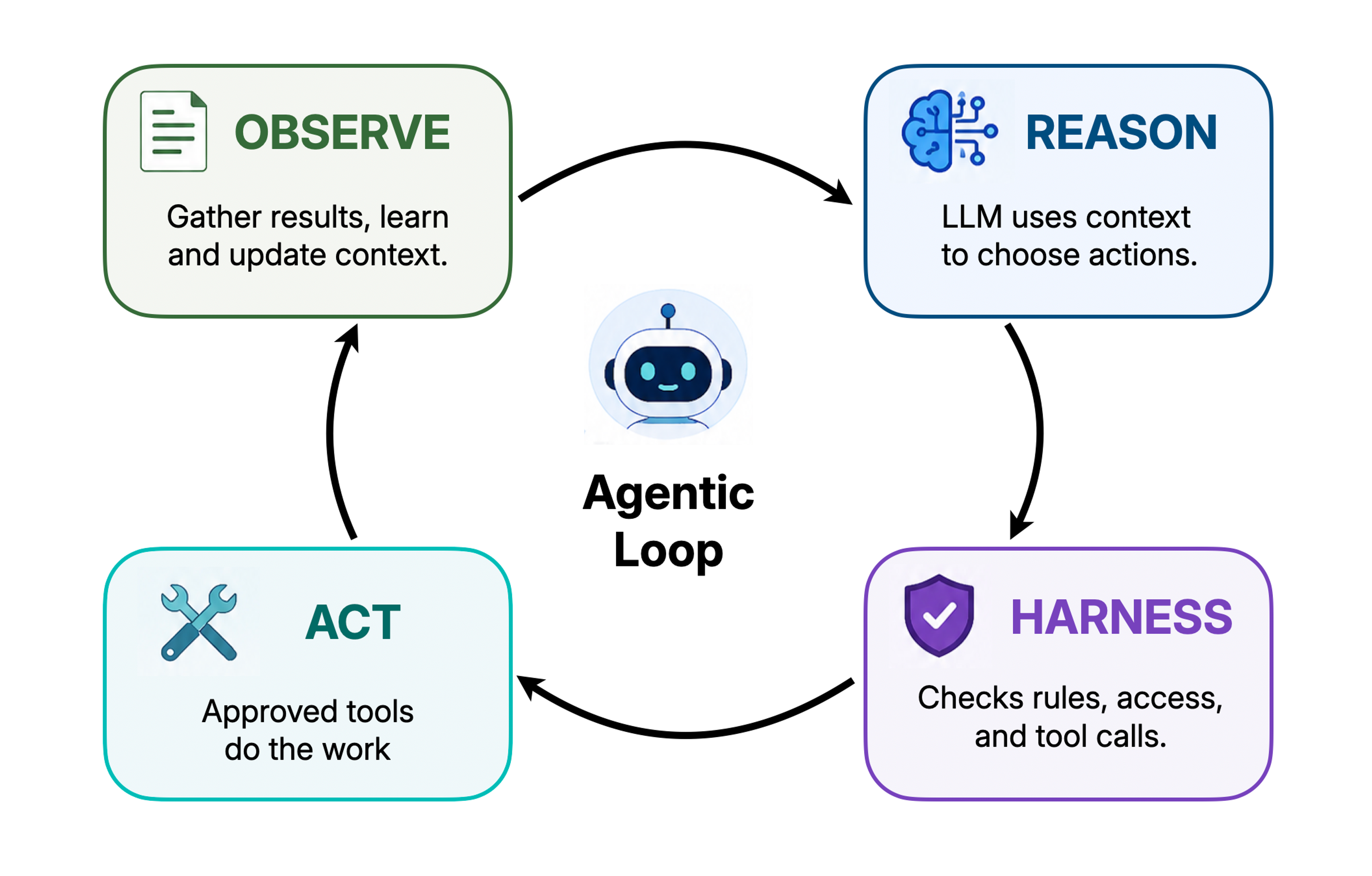
An agent is not a new kind of AI, or model. An agent contains the same models that also provide chat sessions. But built up into an agent, with tools and context and permissions and a loop structure, the models can do things instead of just say things. An agent, at its best, takes your interactions with an LLM model from “Here’s your answer” to “Here’s my work, just how you like it.”
Where do the tools I've heard of fit into this?
My colleague Kevin wrote about everyone's favorite exoskeletal entity, Openclaw, earlier this year. OpenClaw introduced the world to putting models into a loop and giving them broad permissions, sometimes with rather unplanned results. But there are a couple of notable new kids on the block; Pi.dev, and Hermes Agent.
These three are not all trying to be the same thing. They overlap a little, because they share some of the same agentic harness structure. But they are easiest to understand by looking at which part of the agent system they try to own.
- OpenClaw: A gateway / control plane
- Its docs describe it as a self-hosted gateway that connects chat apps like Slack, Telegram, Discord, WhatsApp, Matrix, and others to AI coding agents, with the gateway acting as the source of truth for sessions, routing, and channel connections. (OpenClaw)
- Pi.dev: A customizable agent harness
- More of a harness layer. Its own homepage describes it as a “minimal agent harness,” with support for extensions, skills, prompt templates, providers, session history, remote procedure calls (PRC), and SDK-style usage. (Pi.dev)
- Hermes: A persistent agent runtime
- An always-on agent product/runtime. Nous Research describes it as an agent with persistent memory, auto-generated skills, scheduling, subagents, web/browser tools, messaging surfaces, and sandboxed execution backends. (Nous Research)
OpenClaw
OpenClaw is mostly a gateway. It is the front door and control plane, the thing that connects the places you already talk—Slack, Telegram, WhatsApp, Discord, Matrix, iMessage—to the agent running somewhere else. You tell it what you want, and it tries to find ways to do those things. OpenClaw is narrower in scope than Hermes, and does not center self-improvement in quite the same way.
OpenClaw became an internet sensation almost overnight, garnering more GitHub stars in a few weeks than the juggernauts of open source had acquired in years. By June 2026, OpenClaw had reached roughly 380,000 GitHub stars in under seven months. For comparison, Home Assistant Core, one of the most successful and beloved self-hosted open-source projects, had about 88,000 stars after nearly thirteen years.
OpenClaw went viral because it collapsed the agent pitch into something everyone could understand: “DM this thing and it does stuff for you.” What’s more, it was self-hosted on reasonable computers, chat-native, hackable, and just dangerous enough to feel like the future was arriving early. Sales of Mac minis are yet to recover.
Pi coding agent
Pi is a minimal terminal coding-agent harness. It contains many of the same basic ingredients as an agent: a model, a loop, tools, and project context. But the distinction is that Pi’s center of gravity is the wrapper around that loop. It gives the models a terminal-native working environment they can use to access files, run shell commands, and access skills.
Pi is a small, hackable workbench for tweaking every tiny detail of agentic workflows. If you ever built a 3D printer from parts, it’s like that. What you end up building is custom to you and your need; that journey, as so often happens, becomes the destination. Some people enjoy that process!
Hermes
Hermes is where I'm currently experimenting and having the most fun. It's also the newest entrant into the arena.
Describing itself as an autonomous agent that gets more capable over time, Hermes has an autonomous learning loop, memory, autonomous skill creation, cross-session recall, scheduled automations, subagents, browser/web/media tools, messaging surfaces, and multiple terminal backends.
Hermes keeps useful context between sessions. In practice this means you will spend less time repeating basic setup instructions (“SSH into my NAS, at this IP, with this user, to access my Docker containers”), because Hermes saves these things to a memory.md file. Over time, those repeated patterns can become reusable skills or tools. That means future sessions start with more of the right context already in place, wasting fewer tokens on exploration and leaving more room for the actual work.
Hermes also makes use of an interesting development in local-first AI: “model fusion.” You can save money by using your more expensive tokens from powerful frontier models, like Claude’s Opus or newer OpenAI GPT models, for the first few runs of a complex task. That model does the heavy reasoning, and Hermes uses it to create a skill that captures the complexity of the task. Following up, and iterating on this approach, can be delegated to lesser models, including the kind you can run on your own hardware.
Model fusion is in its earliest days, but it’s encouraging to see work being done toward more flexible AI options.
So what can we do with this stuff?
As a long-term Home Assistant user, I have always been optimistic about natural language control. I truly believe that the best interface for most people is natural language, rather than complex dashboards or memorizing the commands you can bark at a speaker-shaped "smart assistant."
Despite numerous attempts at human-ish conversation with my smart home, I’d end up bouncing off each one. Reliability, complexity, spousal-approval-factor … However, the experience of combining Hermes, Telegram, and Home Assistant feels genuinely futuristic. This might finally be it.
Home Assistant has a built-in MCP (Model Context Protocol) server. MCPs are a standardized way to expose an LLM-friendly interface with certain guardrails, built on their Assist pipeline. By default, the MCP exposes only entities from Home Assistant which are manually chosen. It cannot create automations, dashboards, backups, or a great many other things. This led me to seek out ha-mcp, a standalone MCP server designed to expose far more detail to my Hermes based AI agents.
In Hermes, I created a new profile, named (quite originally) Jarvis. This agent gets his own Telegram bot, plus a group chat into which I was able to invite my wife. From here, the Jarvis profile only gets exposed to Home-Assistant-related chats and resources. We can finally talk to the house in natural language, and it works. It actually works!
Typing “the Kitchen is too hot” into Telegram results in the agentic loop going to work, figuring out that “Kitchen” is in a climate zone downstairs, and so that zone needs to be set lower. Doesn’t sound all that impressive until you realize the contextual framing such a simple command expects. As humans we do this every day—we decipher that context naturally. But this is a really hard problem for machines, agents, and models to grasp.
I’ve found that Jarvis is quite good at remembering specific key phrases I use for common home tasks and adding them to memory by itself. It feels futuristic. Unlike so many prior attempts of mine to reach “talk to home naturally, it responds” this actually works well.
If you already have a Home Assistant instance running, try it out. Ask it to apply all available updates, or figure out from the logs what your preferences are for the lighting in your office when filming a YouTube video. (OK, that one is a niche use case, but my Jarvis agent figured it out, and built me a one-click scene I can now use with, or without, AI help). Once you’ve got the thing humming along nicely, try switching out to a local model, and see if your needs can be met without relying on cloud API calls all day long.
This stuff is moving fast beneath our feet, and we are only just scratching the surface of what’s possible. Come join us over at https://discord.gg/tailscale, in the #aperture channel, and let us know how you’re using agentic workflows.


