 Claus Lensbøl

Part of what makes Tailscale so nice to use is that it just works. You start your computer, you connect to your resource, and then you are there! The only thing you really need is a working internet connection. But it’s usually not such a binary thing, having a “connection,” so much as being on a deliberate, intermittent, and accidental scale of being “connected.”
Ideally, Tailscale can work in as many of these “connected” scenarios as possible. But what does that even mean, and how can we enable Tailscale to work better in all of them?
Introducing netmap caching
Before the deeper explanations of what we’re doing, here’s the short version of what’s happening right now: We are introducing netmap caching, a new feature in the client that saves a copy of your tailnet’s network map (netmap) to disk.
Netmap caching does two things:
- Starts Tailscale faster and reach nodes in your Tailscale network (tailnet) faster, especially on non-ideal connections.
- Connects to some or all of the nodes in your tailnet at startup, even when the coordination server is unavailable.
Netmap caching requires an optional flag to activate as of this writing, but it could become a default feature after successful testing. You can enable, disable, and manage netmap caching with your tailnet policy file, as detailed in our documentation. Test it out, and reach out to support, or open a github issue and add the label client-side-caching, if something is not working as expected. Netmap caching is currently not available on Android and iOS, but will come later.
Now, let us dive into how netmap caching works, and why it makes connections both faster and possible where they were not before.
“Connected” to the internet
Let us start with an obvious level of “connected.” If you unplug your ethernet cable, turn off Wi-Fi, or find yourself without service, you are at one end of the “connected” spectrum. You have no internet connection at all, and Tailscale will not work.
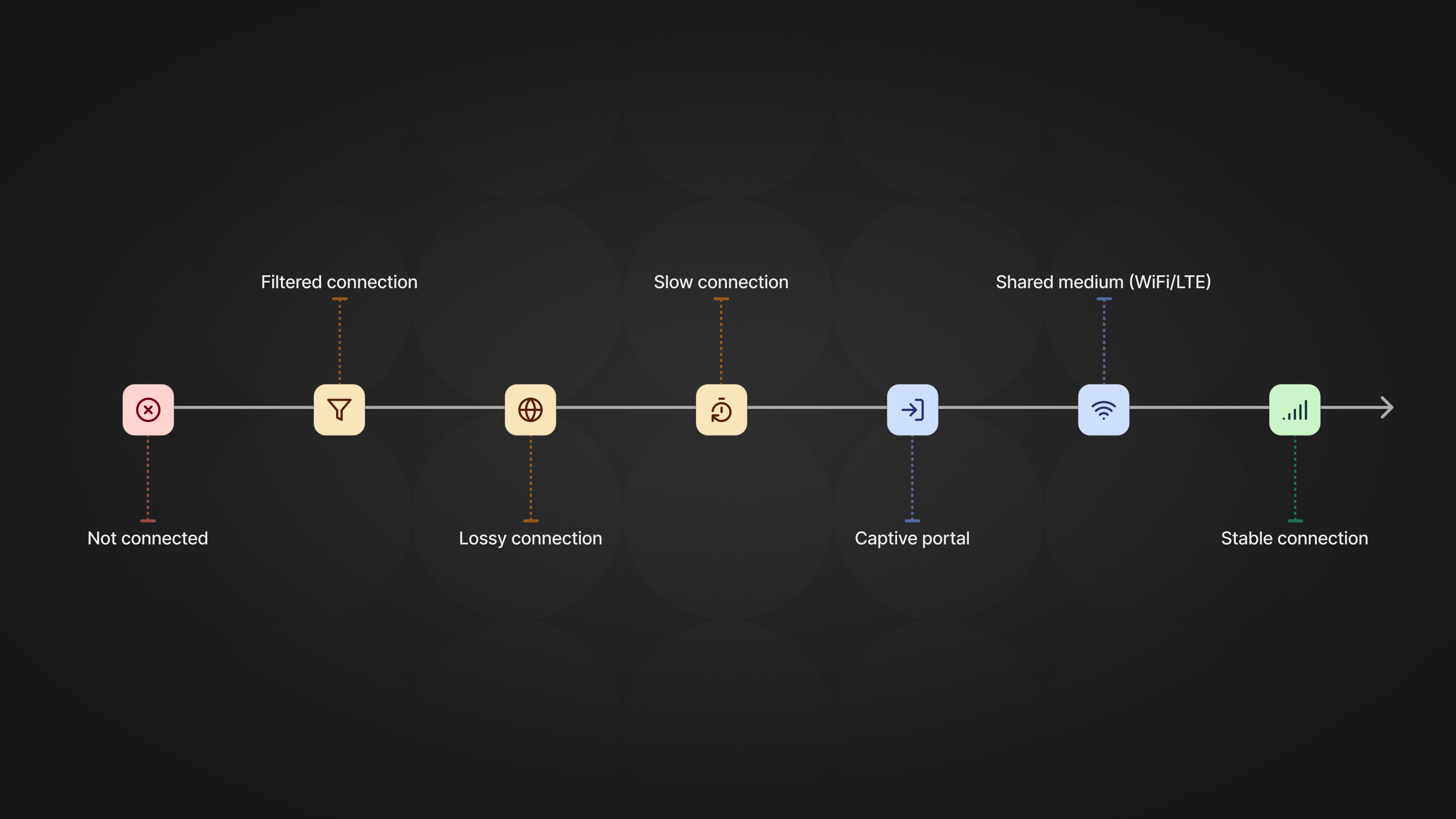
There are more subtle versions of being less than ideally “connected,” though. You could find yourself at a hotel, in a public library, on a plane, at a cafe, or in another situation where you don’t control the internet. Each of these locations could have a captive portal, filter or limit certain kinds of traffic, have a bad connection, or cause other other scenarios that make “connected” more of a fluid term. So what does that mean for Tailscale?
How much internet does Tailscale need?
Generally, the nodes on your tailnet need access to three things on the internet to connect to each other:
- The coordination server
- DERP servers
- The other nodes on your tailnet (if you want direct connections)
The coordination server exchanges information like cryptographic keys, the Designated Encrypted Relay for Packets (DERP) server a node is connected to, and endpoints (IP addresses and port numbers). The DERP servers relay connections for nodes that cannot talk to each other directly, and hand off public key material to bootstrap direct connections and help with NAT traversal.
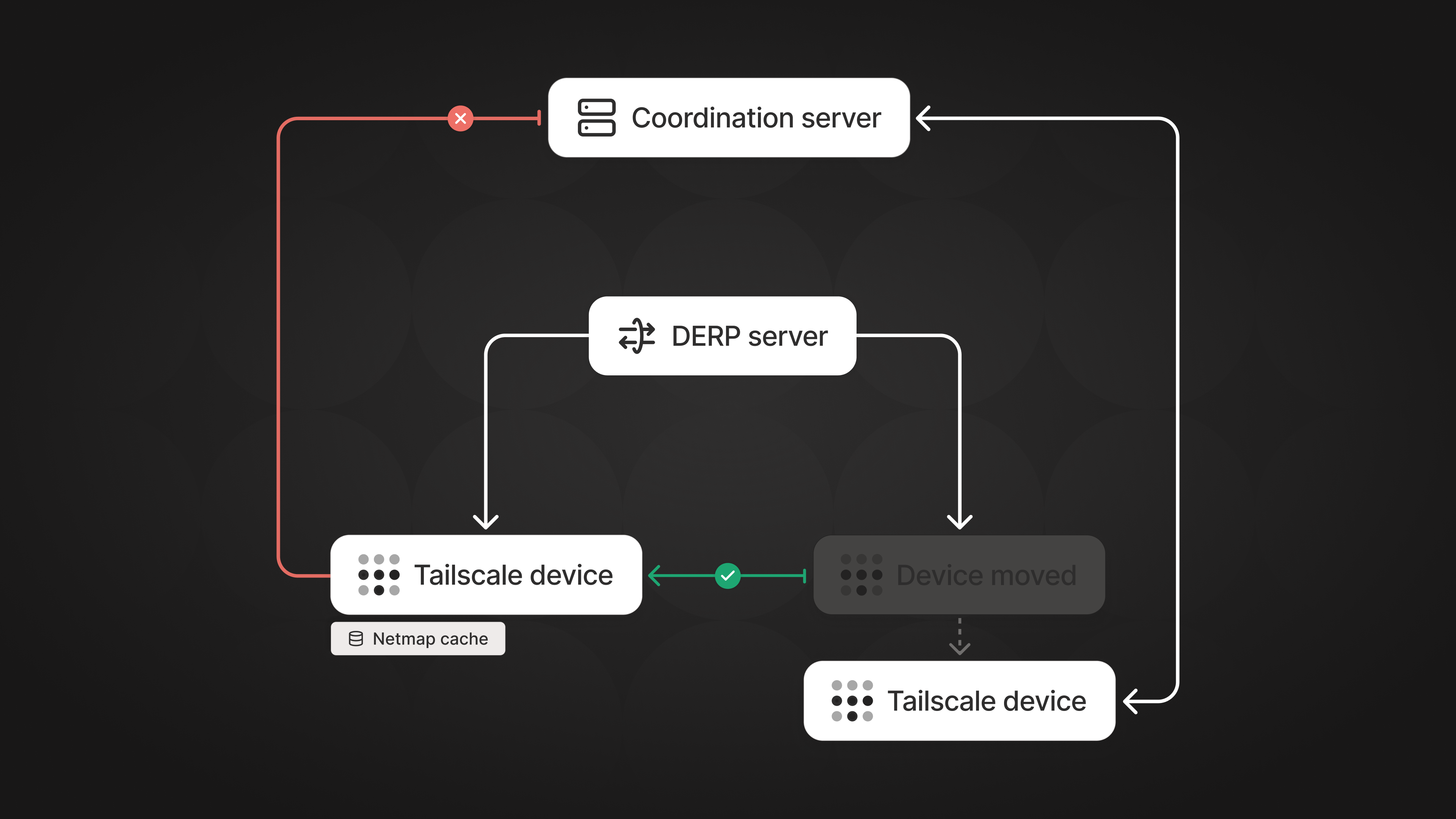
Once your node is connected to the tailnet, it keeps this information in memory, as long as Tailscale is running and not restarted (or switches profiles) on the node. This means you can make new connections to other nodes on the tailnet, even if the coordination server is temporarily unreachable, or if there’s a problem with the coordination server (an event that will quickly draw the attention of Tailscale engineers).
Established connections are not affected by coordination server gaps. Only new or changed nodes on your tailnet are. Over time, the ability to make new connections between nodes without a coordination server could degrade as nodes move around, but Tailscale tries to connect your devices whenever it can.
But that “not restarted” caveat is a problem. People start and stop machines, for many good reasons, as part of their everyday life and workflow. So how can devices find each other on the tailnet right after Tailscale starts?
How netmap caching works
The short answer to the “sometimes Tailscale restarts” problem is that we cache the necessary information to disk, and do some smart protocol tricks. But there’s also a longer answer with more context and detail.
The netmap
Remember from before that the coordination server shares information about each device with the others. All this information together is a network map, or what we call the “netmap.” The information inside the netmap can be roughly split into two categories:
- Settings for the node itself, such as DNS, routes, and capabilities
- Information about other nodes
Both of these are important, but the latter is more interesting, especially the data around “where” that node is. This comes in two parts:
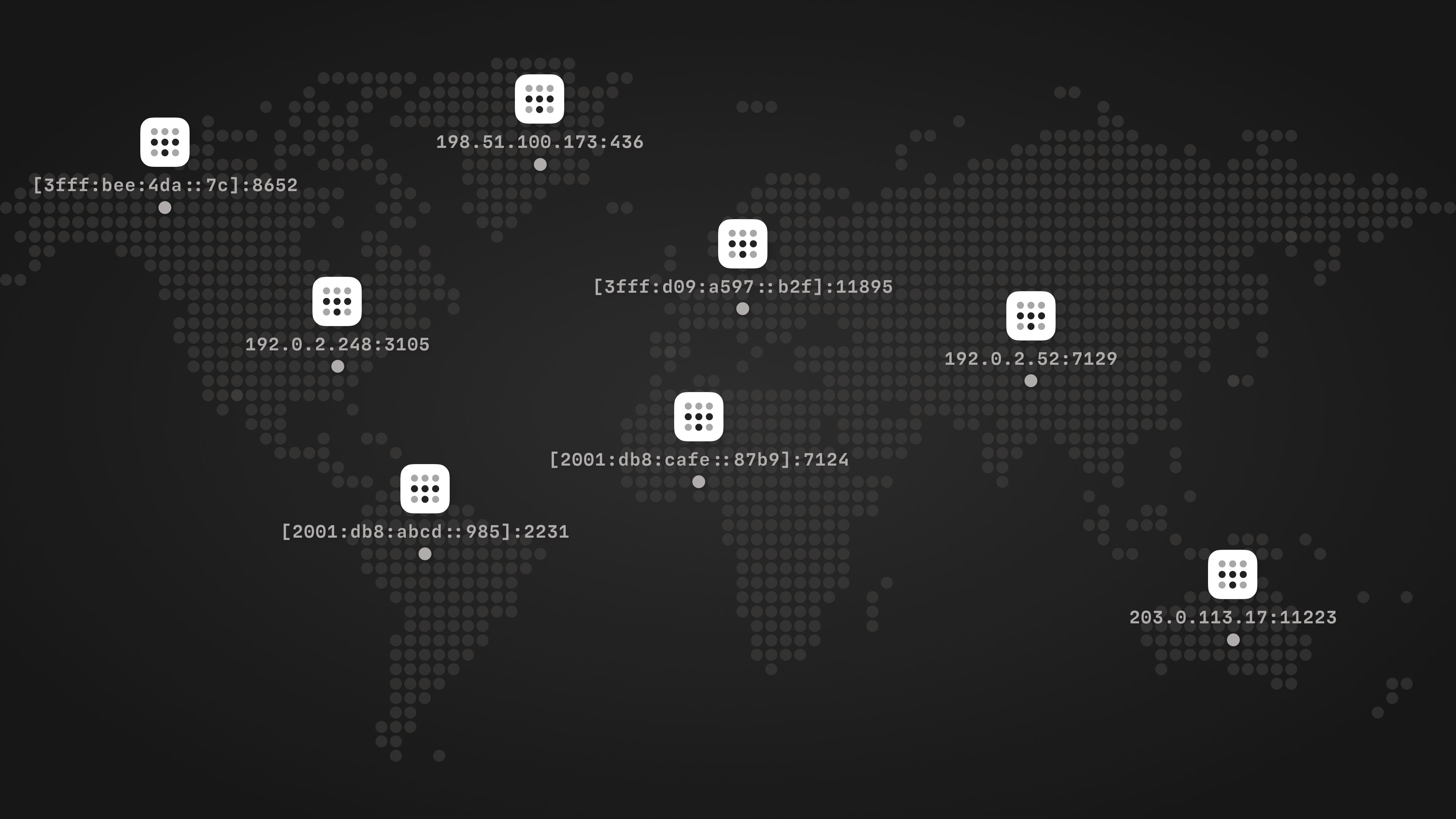
- Endpoints: IP address (IPv4 or IPv6) and UDP port pairs. Usually there will be multiple of these pairs, which makes it more likely that Tailscale can make a direct connection to this node.
- Home DERP region: The DERP server the node is connected to, so Tailscale can bootstrap a direct connection to the node via that DERP server if needed.
A lot more data lives in the netmap, but this essential information helps us locate the other nodes.
Importantly, the netmap for two nodes will not be the same. First of all, the “self” node data will be different for each node, but also the “Who can communicate with whom” rules of a policy file are enforced via the netmap. That means that the netmaps received by nodes are unique to them.
Another thing to know is that the coordination server sends as little netmap data as possible, as most things do not change inside the netmap. Once a full netmap has been sent, the coordination server sends only changes. Endpoints will change frequently, while DNS and other settings stay fairly static.
Now that we have and understand the netmap data, we can do something with it!
Cache to disk
The most obvious and useful thing to do is to write this information to disk, locally, as a cache. When the client starts, restarts, or switches to another profile, we can read this cache and get started communicating between nodes. Reading from the cache is somewhat simple; writing to the cache is more complicated.
Storing to disk has two costs: the time it takes to write this cache, and wear on your device’s storage.
To minimize those costs, Tailscale writes only what changed. To do that, we split the data into relevant chunks, like “information about this device itself on the tailnet” and “information about that other device.” The last write is remembered, and we only write again if it has changed. That’s a good start!
On top of that, the coordination server only tells a node about other nodes it can connect to, based on the policies defined for the tailnet. So this cache holds nothing about nodes you cannot connect to on the tailnet.
In the information we store about the device itself (the "self" node), we also store the latest DERP server your node prefers. This ensures that the node itself will select the previous DERP server as home, rather than the nearest one. This helps other nodes find the device, since the DERP home is communicated via the coordination server.
When we get a full netmap from the coordination server, we update the full cache and expire any old items in the cache that had not been explicitly deleted by the coordination server.
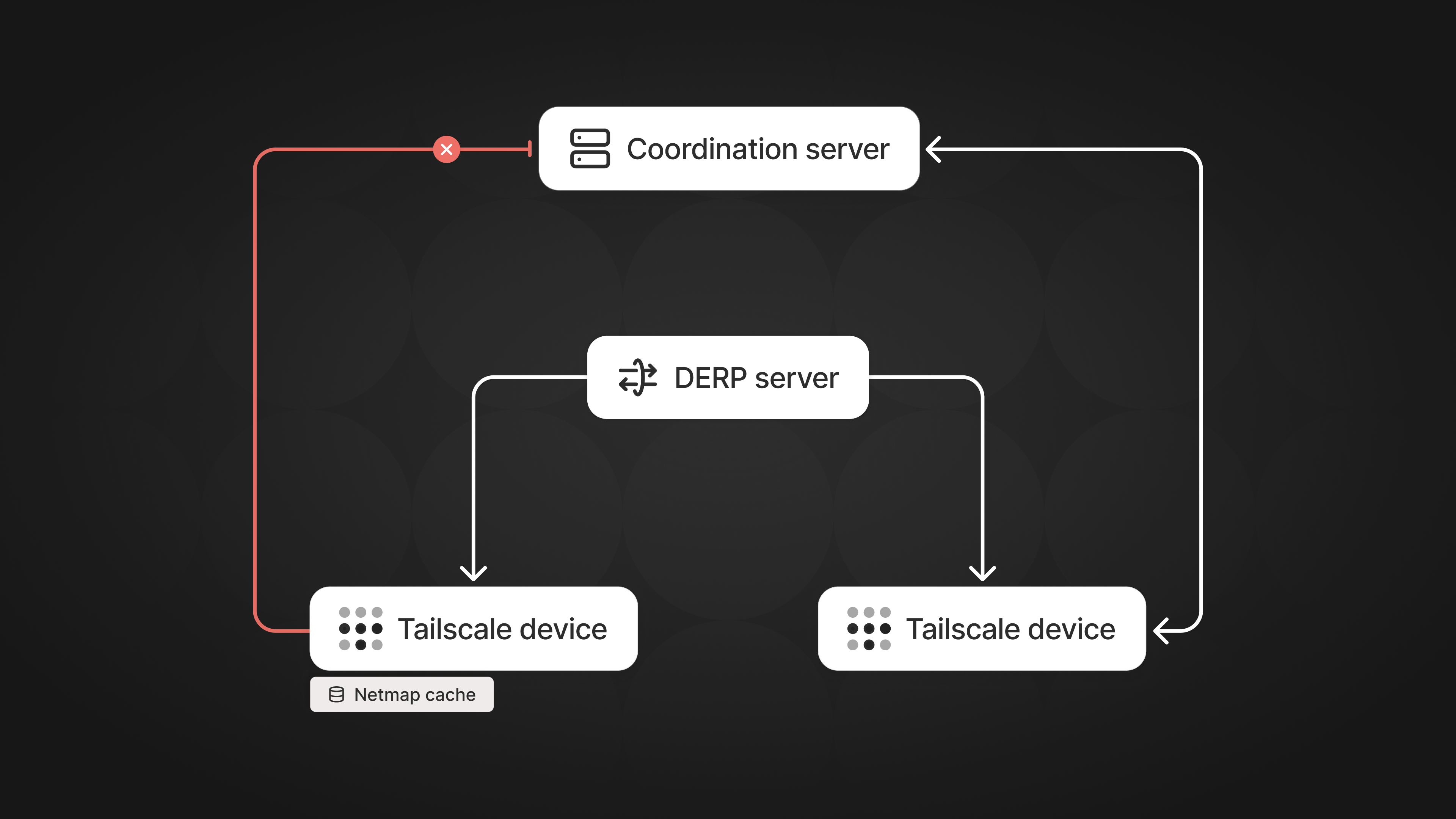
At this point, with these things cached, your computer can boot and start Tailscale, and you can (usually) communicate with other nodes in your tailnet, using an encrypted WireGuard® connection relayed over DERP. But you will still not be able to make any direct connections to other nodes. Why is that?
DISCO, a dance of nodes
Those who have dug into Tailscale might know about a protocol called DISCO. Some say it’s short for “discovery,” but I like the dancing reference much more. Who really knows? (My colleagues who wrote the protocol do, but where’s the fun in just following what they say?)
DISCO is responsible for two things: sharing possible open endpoints to another node, and testing if the endpoints are working to establish direct connections. DISCO is also involved in establishing connections over Tailscale Peer Relays, but that is a post for another time.
DISCO is based on public-key cryptography, to ensure that information about your endpoints cannot be seen by third parties while in transit. For this encryption scheme to work, each end of the connection needs the public key of the other end.
The DISCO keys in Tailscale are short-lived. Whenever Tailscale starts, or switches to another profile, it generates a new key pair on the client. As a result, the other device can’t decrypt and read your DISCO messages until it learns your new public key. When everything is working fine, this is not a problem, as we can share these keys via the coordination server. But if the coordination server is unreachable, the nodes will not be able to communicate with each other via DISCO, and cannot establish direct connections. You’re kind of connected, but not entirely.
See? There are lots of shades of “connected,” and we’re still not fully there. But what do we do about that?
Smart protocol tricks
We have established that with a cache available, we can often make a WireGuard connection relayed over DERP. This means we already have an encrypted connection to the other node, but not a direct connection negotiated via DISCO. What we can do is stick the new DISCO public key into a message that flows inside the encrypted WireGuard tunnel via DERP, and have another device listen for it. By sharing DISCO public keys this way, we can bootstrap DISCO, and the process of making direct connections between nodes works again.
This comes with an extra layer of complexity, as we now have to reason about “which key is correct” in scenarios where one node can talk to the coordination server and the other cannot. We solve this by remembering multiple DISCO keys learned from another node, either through the coordination server or these encrypted key exchanges.
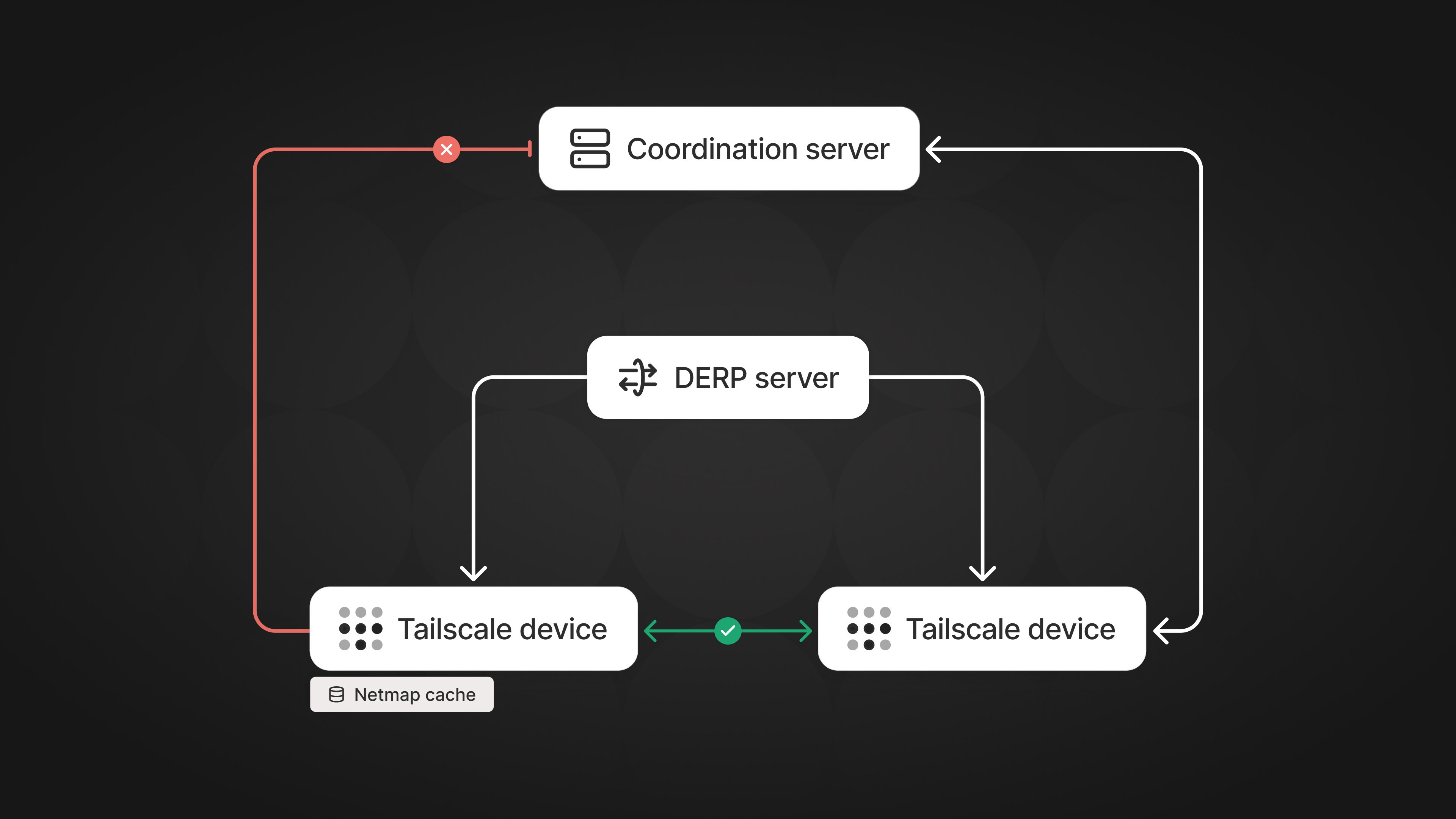
Now we are able to establish direct connections again, this time without the coordination server being involved! There is still that disclaimer from earlier: when you cannot reach the coordination server, your ability to connect to other nodes will degrade over time. But now we can connect a new set of clients that were never able to connect before!
Degraded connections over time
A node will not be able to stay online indefinitely without contacting the coordination server. Over time, as the netmap changes, the nodes not connected will not get these changes. Other nodes that have moved to other endpoints, nodes that have been added/removed, policy changes, DNS shifts, and more will not be reflected in the cached netmap. A cached netmap is a faster starting point, but it needs to keep contact with the reality of your tailnet. The coordination server remains a central component of the Tailscale infrastructure for exchanging netmap changes, but we are now more resilient against network outages.
It is important to know that if the policy file changes, as long as one node is connected to control, that policy will still be enforced, as we enforce the policy on both ends of a connection.
Other impacts
For some users, especially those on slower and flakier networks, having to establish a good connection to the coordination server, and getting that initial map of the network, can take some time. With the principles we have discussed in this post, an initial, “minimum viable” map can instead come from the cache. Once a connection to the coordination server is established, the latest information flows in.
This might seem like it is not a big deal, but this jump-start of connections can make a huge difference in startup time, for both end-user devices and servers alike. You can read about the impact of netmap caching on faster connections in our post on making Tailscale faster.
In the end, that is what Tailscale is all about: connections that just work, without you having to think about how or why!
You can get started using netmap caching during this early opt-in period with the help of our docs. Let us know how it works for you, and how we can improve it.


