 Alex Kretzschmar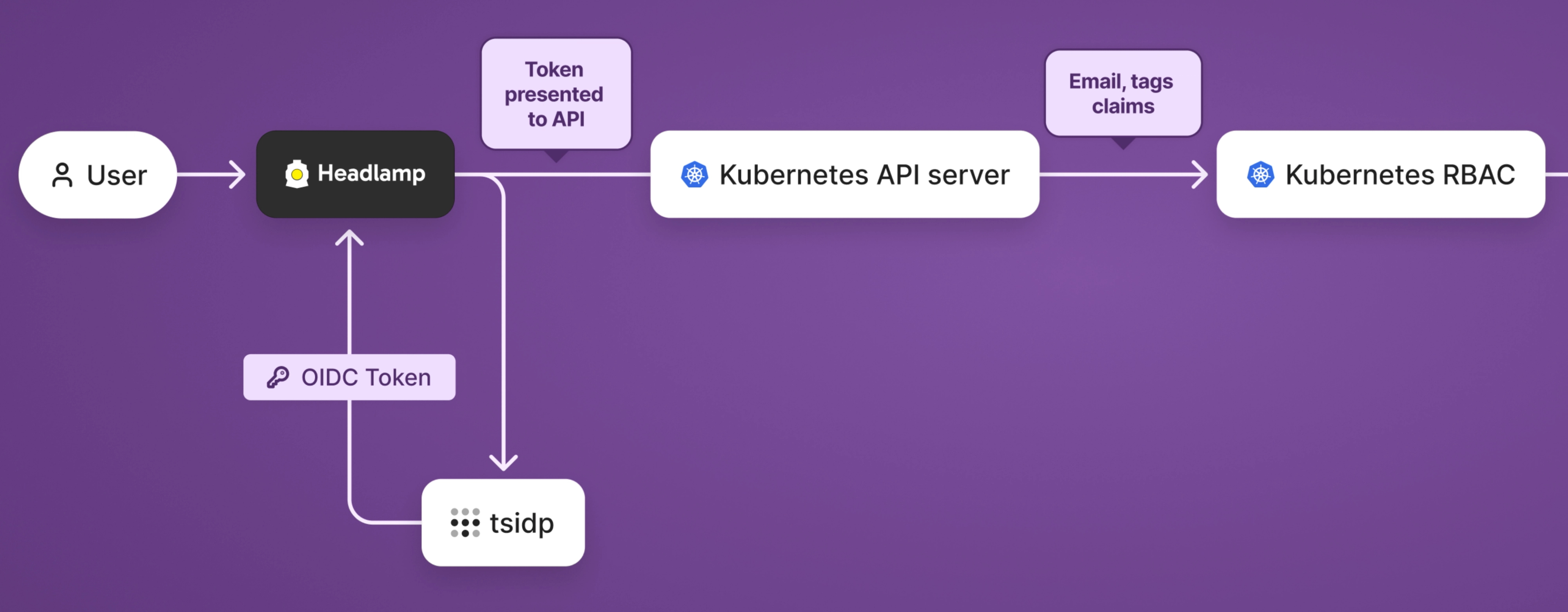
Headlamp is a Kubernetes dashboard I use to get a quick view of what is happening in my clusters. It is lightweight, extensible, and supports OIDC. And configuring it to play nicely with OIDC and RBAC is a real, shall we say, education in Kubernetes.
I ran Headlamp as a cluster app and plugged it into Tailscale's tsidp, a tailnet-aware OIDC server. It promised a very clean setup: Tailscale would be the path to the app, the DNS, the HTTPS layer, and the identity provider. Everything looked good until I actually tried to log in.
Alas, dear reader, as is often the case in Kubernetes-land, it was time for a small side quest.
Headlamp was up. Tailscale ingress was up. I could access Headlamp via https://headlamp-clustername.funny-name.ts.net. Everything was automatically configured using Tailscale's Kubernetes Operator. I could even load the login page. But when I authenticated, I kept getting bounced straight back out again during the login flow.
What follows is a tale of woe learning and discovery about how some of the pieces of the Kubernetes jigsaw fit together.
Because of the OIDC configuration I had supplied, Headlamp knew how to trust my Tailscale identity, but the Kubernetes API server did not. Headlamp and Kubernetes were disagreeing about who I was.
And once I understood that, the rest of the fix was fairly straightforward.

Why login was broken
The problem in this chain is that "logging in" to Kubernetes is not a single step.
There are several components that must all agree with each other to let you in. If one of these components can't match up your identity somehow, the whole login flow falls apart. That's what was happening here.
In my case, Headlamp was configured to use Tailscale as its OIDC provider, and that part was working. But when I tried to log in, Headlamp failed opaquely, without a useful error. Headlamp sent me to my tsidp identity server, and returned a token successfully.
So far, so good.
But Headlamp is only the front end. It is not the thing that decides whether I am allowed to interact with cluster APIs to read Pods, inspect Deployments, and so on. In this case, that job is entrusted to the Kubernetes API server.
Side note: I did look at using the Tailscale Kubernetes API proxy specifically for Headlamp, but it was ultimately more awkward than it was helpful. We are still using the API proxy for cluster access elsewhere; for Headlamp, that approach requires pulling in a separate kubeconfig, internal DNS, and egress proxying. In the end, I opted to stick with the tsidp-based OIDC route:
- Headlamp remains a normal cluster app
tsidphandles logins- Kubernetes API server is configured to trust the same issuer
This ultimately meant the cluster’s role-based access control (RBAC) could work the normal Kubernetes way. Once the API server trusted the same OIDC issuer as Headlamp, my Tailscale identity flowed cleanly through to Kubernetes permissions, and Headlamp worked again. Understanding why that fixed the problem, however, was perhaps harder than applying the fix itself.
Trust me, bro
There are really five trust relationships at work here.
First, the browser trusts the Tailscale-served HTTPS endpoint for Headlamp. We've all seen the "this website is dangerous" HTTPS warnings on self-signed or expired certs, right? Tailscale serve does away with them.
Second, Headlamp trusts tsidp as its OIDC provider. That is what allows it to redirect the user for login, and later accept the returned token as meaningful.
Third, tsidp trusts Headlamp as an OIDC client. That means the configured client ID, secret, and callback URL must all be valid from the identity provider’s point of view.
Fourth, the Kubernetes API server trusts tsidp as the issuer of the token. This is the critical part that was missing in my setup. Until that was configured, Kubernetes had no reason to accept the token Headlamp was presenting.
Fifth, Kubernetes RBAC trusts the token claims enough to map them into a subject. In my case, that meant using email as the username and tags as groups, then applying the appropriate bindings.

Configuring kube-apiserver
As noted, the kube-apiserver is the critical missing link in our chain of trust. Therefore we need to provide it the information it needs to trust our tsidp OIDC issuer.
apiServer:
    extraArgs:
      oidc-issuer-url: https://idp.funny-name.ts.net
      oidc-client-id: abc123abc123abc123abc123
      oidc-username-claim: email
      oidc-groups-claim: tags
| Setting | What it does |
|---|---|
oidc-issuer-url |
Which OIDC issuer to trust |
oidc-client-id |
Which audience the token must be for |
oidc-username-claim |
Treats the email claim as the Kubernetes username |
oidc-groups-claim |
Treats the tags claim as Kubernetes groups |
And with this token configured, Headlamp could now successfully hand the API server a token issued by tsidp, but that was not enough on its own. The API server needed to know which issuer to trust, which client ID the token was meant for, and which claims inside that token represented the username and groups. Until that was configured, the token was just an opaque blob of JSON and cryptography that Kubernetes had no reason to accept.
Once I taught the API server to trust tsidp and map the email and tags claims correctly, the token stopped being an untrusted bearer token and started becoming a real Kubernetes identity.
I was now able to login using nothing but my Tailscale identity. In other words, no kubeconfigs, no usernames, no passwords. My Tailscale identity flows all the way through to Kubernetes RBAC. If you don't think that's cool, then, well, what are you doing reading this post?
Cluster level identity mapping
OK, we can log in but we're not done yet. Now Kubernetes knows who I am, but it still doesn't know what I'm allowed to do. Authentication tells Kubernetes who I am, RBAC tells Kubernetes what I am allowed to do.
Because I had configured oidc-username-claim to use email, Kubernetes saw my Tailscale identity as email@example.com. From there, the fix required creating a ClusterRoleBinding for that user and mapping it to a role.
In my case, I used cluster-admin. Given this is only a homelab scenario, I was happy enough with that trade-off. In a shared cluster, I would almost certainly be more restrictive.
apiVersion: rbac.authorization.k8s.io/v1
kind: ClusterRoleBinding
metadata:
  name: oidc-cluster-admin
roleRef:
  apiGroup: rbac.authorization.k8s.io
  kind: ClusterRole
  name: cluster-admin
subjects:
  - apiGroup: rbac.authorization.k8s.io
    kind: User
    name: user@example.com
This was the final piece of the puzzle. Headlamp could now log me in, the Kubernetes API server could verify who I was, and RBAC could map that identity to permissions that actually let me use the dashboard.

This is so nice
What I like about this setup is that the same identity flows all the way through it.
- I use Tailscale to reach Headlamp
- I use Tailscale to sign into Headlamp
- Headlamp presents that Tailscale-issued token to Kubernetes
- Kubernetes trusts that token
- RBAC turns that identity into permissions
Tailscale is not just acting as a VPN here. It is the network path, the DNS, the HTTPS implementation, and the identity provider. Once the Kubernetes API server was configured to trust the same issuer as Headlamp, the whole thing clicked into place.
That is what made this feel so clean in the end. I was not juggling kubeconfigs, service accounts, static tokens, or another auth stack. I was just using my Tailscale identity all the way through to Kubernetes RBAC. With my side quest complete, and many dangerous foes vanquished along the way, it was finally time to get back to the main quest and see what fresh nonsense Kubernetes had waiting for me.


